
GlymeraMinimap
- By
- Mods
Unbenannt_1.jpg
Unbenannt_2.jpg
Description
GlymeraMinimap — A Smooth, Server-Side Minimap
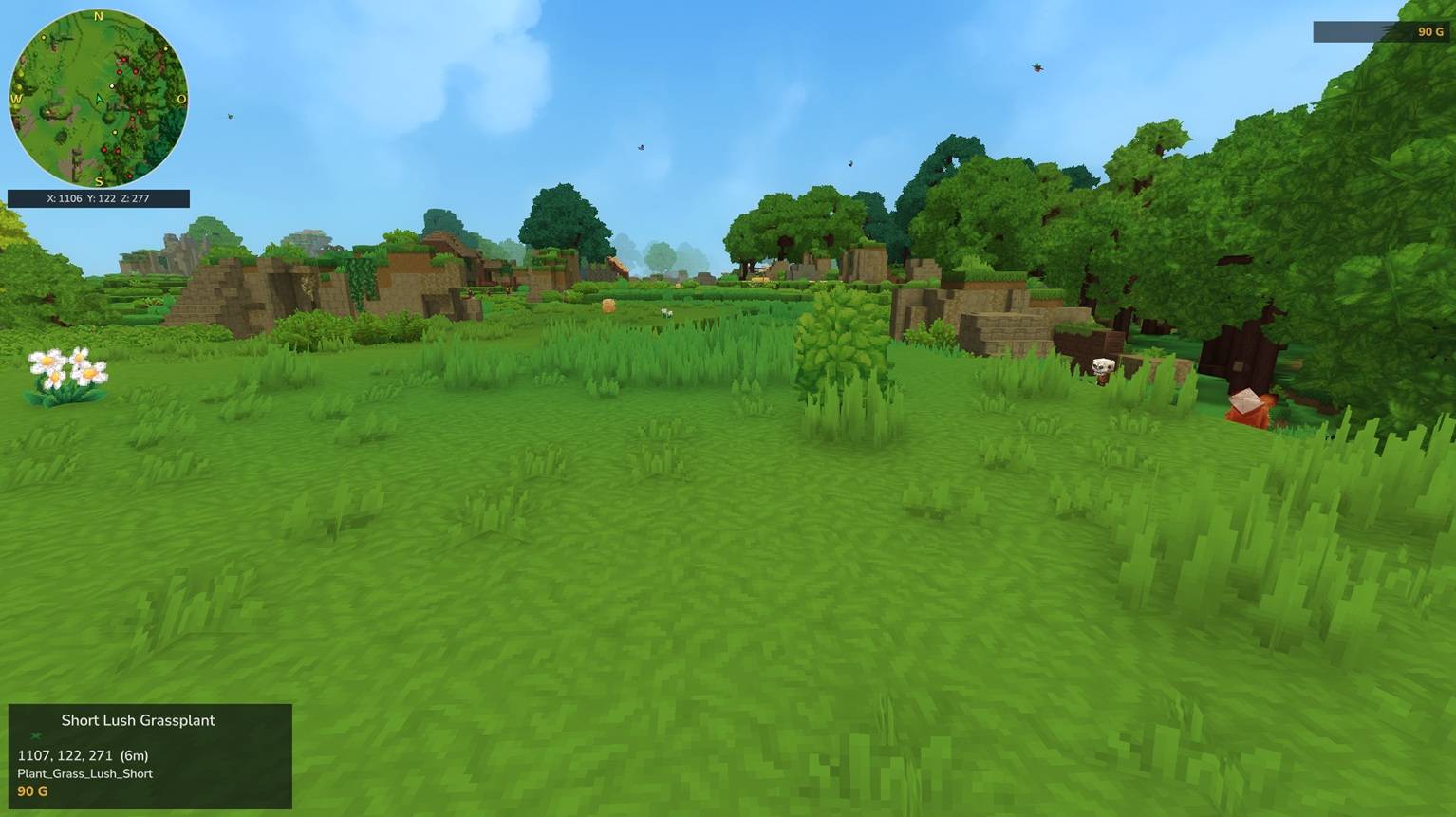
A clean live minimap for Hytale — no client mod required. The map is rendered on the server from the game's own world-map data and streamed straight to each player's screen, so everyone gets it automatically just by joining.
GlymeraMinimap is built to live alongside your other HUDs. It is sent as a direct packet instead of claiming the single custom-HUD slot, so scoreboards, other overlays and custom HUDs keep working at the same time.
What is GlymeraMinimap?
A circular minimap in the corner of your screen that pans smoothly under a centred player marker as you walk — no stepwise refreshes, no jitter. It shows the terrain around you, the creatures and players nearby, and where you died, with your coordinates underneath. Keep it classic north-up, or switch it to rotate with your view — your heading up, the world turning under you.
Works out of the box — no setup needed, every player gets the map automatically. Admins can optionally set where it starts and lock it in place (see For Admins).
For Players
- A live top-down map in the corner, with your coordinates underneath, N / O / S / W compass letters and a directional arrow.
- NEW: North-up or rotate-with-view — your choice. By default the map is classic north-up. Flip "Rotate with view" in the settings (or
/mm rotate on) and the map turns with your view direction instead — your heading is always up, like the rotating minimaps you know from other games. The compass letters detach and slide around the rim so they always point at the true world directions, and the arrow + map always add up to your exact heading. Per player, saved across sessions. - Smooth panning. The map glides as you move instead of snapping frame by frame, and it fills in as you explore new ground.
- Pick your own corner. Place the map in any of the four screen corners from the settings page — your choice is saved and follows you across sessions.
- Pick your own size. Each player sets how big their minimap is with
/mm size— your choice is saved and follows you across sessions. - See what's around you. Nearby creatures appear as coloured dots, other players as arrows:
- white = friendly, yellow = neutral, red = hostile
- a neutral creature turns red while it's actively hunting — so you spot danger before it reaches you. (This live-aggression colouring is unique to GlymeraMinimap.)
- Death marker. When you die, the spot is marked on your map so you can find your way back.
- Hide far-off mobs. Optionally only show creatures near your own height, so deep caves and mobs far above don't clutter the map.
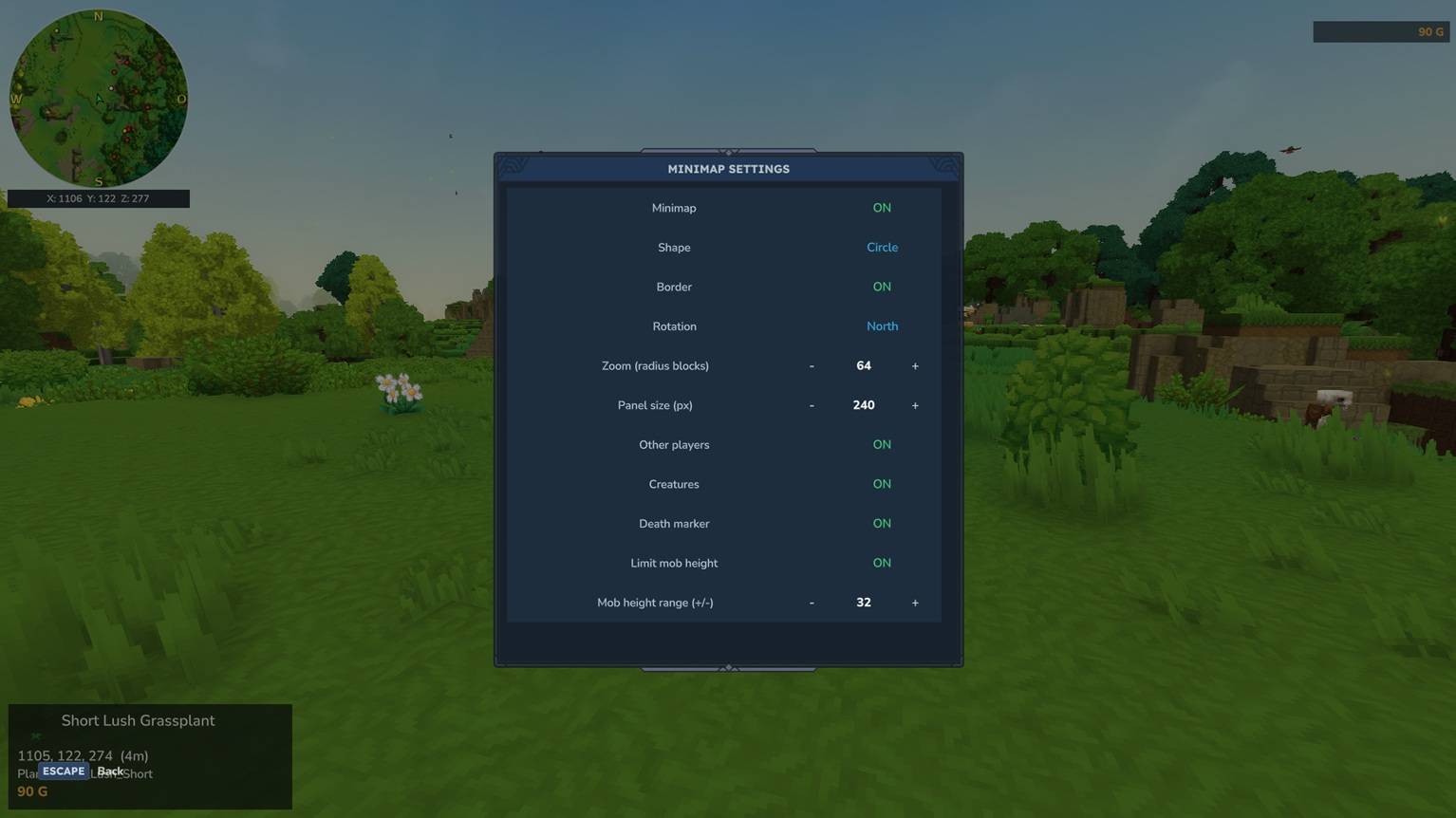
- Your settings, your way. An in-game settings page lets each player toggle the map, set the zoom, choose a corner, choose which markers to show, and tune the mob-height filter. Every player has their own settings, with no admin gate by default (a server admin can optionally lock them — see For Admins).
In-Game Settings Page — /mm settings
A clickable page that updates instantly, in place:
- Minimap — on / off
- Rotate with view — map turns with your heading / stays north-up
- Corner — top-left, top-right, bottom-left, bottom-right
- Zoom — visible radius in blocks
- Other players — show / hide player markers
- Creatures — show / hide creature markers
- Death marker — show / hide
- Limit mob height — only show creatures near your height
- Mob height range — the ± band for the height filter
(Map size is set with the /mm size command rather than on this page — resizing redraws the HUD, and doing that from an open page would briefly garble it, so it lives as a command.)
Commands
| Command | Description |
|---|---|
/mm settings (/mm gui, /mm menu) |
Open the settings page |
/mm on / /mm off |
Turn the minimap on or off |
/mm rotate on|off |
Map rotates with your view / stays north-up |
/mm size <120..360> |
Your minimap panel size in pixels (default 240) |
/mm zoom <16..256> |
How many blocks the map shows from the centre to each edge |
/mm height <4..256>|off |
Only show mobs within ±N blocks of your height |
/mm markers players|entities|death on|off |
Turn individual markers on or off |
/mm status |
Show your current settings |
/mm admin |
(OP) Set the default minimap new players get on first join |
Every player configures their own minimap — corner and size included — with no permission gate by default. A server admin can optionally lock this; see For Admins.
For Admins
GlymeraMinimap still works out of the box — drop the jar in and every player gets the map. Two optional controls let you fit the minimap to your server:
Set the default minimap for new players — /mm admin (OP only)
Opens the same settings page, titled "Admin: Default Minimap for New Players", but it edits the server default instead of your own minimap. Whatever you set here — the screen corner, zoom, which markers show, and so on — is what a brand-new player starts with on their first join.
This is handy when the default top-left corner overlaps your scoreboard or other HUDs: set the default to another corner once, and every new player gets it there automatically.
- OP only — non-OP players can't open it.
- Players who have joined before keep their own saved settings; this applies to first-time joiners.
Optionally lock players to that default — config.json
mods/de.glymera_GlymeraMinimap/config.json:
{
  "allowPlayerChanges": true
}true(default) — players freely move, resize and tune their own minimap, exactly as before.false— non-OP players are locked to the admin default: their settings page and the/mmtuning commands are turned off, so the minimap stays exactly where you put it. OPs are never restricted.
Data directory: mods/de.glymera_GlymeraMinimap/ — per-player settings under players/, the server default in default.json, and the lock switch in config.json.
Installation
- Place
GlymeraMinimap-7.0.0.jarin your server'smods/folder. - Start (or restart) the server.
- Done. The map appears for every player automatically.
Performance
GlymeraMinimap is built to scale to a full server:
- The server tick stays light. The per-player loop only does cheap work on the world thread — read position, pan the map, scan nearby markers, push tiny UI updates.
- Heavy rendering runs off the main thread. The terrain image is composited and PNG-encoded on a dedicated background pool, and the map is only re-streamed when you move into new area or the terrain changes — so there are no tick lag spikes even with many players online.
- Bandwidth-aware, even at high speed. Per-frame updates are tiny; the full terrain image is re-streamed at most a couple of times per second and otherwise just panned client-side, so even a player fast-travelling across the world can't saturate the connection. Identical images are de-duplicated and skipped.
- Rotation mode is budgeted the same way. While you actively turn, the map updates in fine steps (8 per second since v8) using small reduced-size packets, and the moment your view settles it sharpens back to full resolution — a spinning player stays in the same bandwidth ballpark as a fast-travelling one. North-up players pay nothing at all.
- Small, bounded memory per player (cached arrow/marker icons, a handful of cycling terrain frames).
Comfortably handles dozens of players at once on typical hardware.
Good to Know
- The terrain comes from the game's own cartography (the areas the world has generated), so the map fills in as you and others travel.
- The map is circular with a border ring, north-up by default — or rotating with your view if you prefer (per player).
- Rendered via direct packets, so it coexists with other custom HUDs instead of fighting over the single HUD slot.
- New players start from the server default (set with
/mm admin) — including the rotation mode; everyone can then place, size and tune their own map unless the admin has locked it. - Survives world changes: no crash when teleporting between worlds, and the map keeps working (no dark/faint HUD) afterwards.
- Robust at any travel speed — fast-flying through unexplored terrain won't disconnect you.
Data directory: mods/de.glymera_GlymeraMinimap/
Made with care by Glymera for the Hytale community
The GlymeraMinimap Team
