
1000120363.gif

MCPEDL
Description
Auto Totem+
Never worry about running out of Totems of Undying during intense PvP or dangerous survival situations again! Auto Totem+ by FleetMc Studio automatically manages your offhand totems, provides real-time HUD alerts, includes a custom crafting recipe, usage statistics, customizable warning settings, and an in-game control menu.
Designed to be lightweight and multiplayer-friendly, Auto Totem+ helps you stay alive while giving you more control over how the automatic Totem system works.
✦ How to Use
Place a Totem of Undying in your offhand as usual. Whenever your Totem is consumed, the addon instantly checks your inventory and automatically equips another one if available. Every successful replacement also displays your remaining Totem count in the Action Bar.
✦ Automatic Totem Replacement
- Instant Auto Equip — Automatically equips another Totem of Undying immediately after your current one is consumed.
- Shield Safe — The addon does not replace Shields or other offhand items. Automatic replacement only activates when a Totem was previously equipped.
- Inventory Search — Automatically searches your inventory for spare Totems without requiring manual interaction.
- Per-Player System — Auto Totem can be enabled or disabled individually for each player.
✦ Totem Counter & HUD
- Real-Time Totem Counter — Displays your remaining Totems every time one is automatically equipped.
- Green Status — Shows when you have a healthy supply of Totems.
- Yellow Status — Warns you when your Totem supply is getting low.
- Red Status — Alerts you when your remaining Totems reach a critical level.
- Sound Alerts — Different notification sounds help you recognize your Totem status quickly.
- Custom Warning Threshold — Choose your own low-Totem warning level from the in-game menu.
✦ New in Version 1.6
- Lifetime Save Counter — Track how many times Auto Totem has successfully saved you by automatically equipping another Totem.
- Personal Totem Statistics — View your lifetime saves, current inventory Totems, and whether Auto Totem is currently enabled.
- Custom Warning Threshold — Set the Totem warning level from 1 to 10 Totems according to your preference.
- New Stats Command — Use
/fmc:statsto quickly view your Auto Totem statistics. - New Help Command — Use
/fmc:helpto view the available Auto Totem commands. - Improved Settings Menu — The Totem Menu now includes Auto Totem controls, statistics, warning settings, and command help.
- Per-Player Controls — Players can independently turn Auto Totem ON or OFF without affecting other players.
- Improved HUD System — Totem status remains visible for a short time after a replacement so you can easily check your remaining supply.
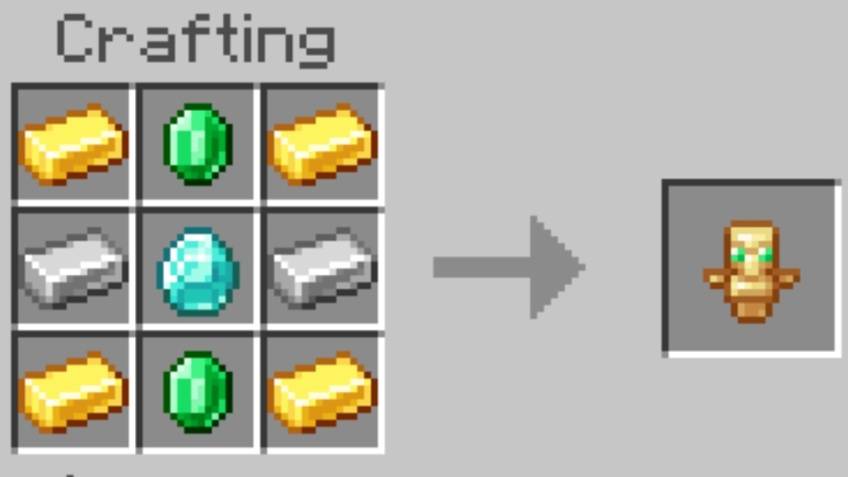
✦ Custom Totem Recipe
You can craft Totems of Undying directly in Survival Mode using a Crafting Table.
Recipe
✦ Commands & Settings Menu
Auto Totem+ gives you multiple ways to control the automatic replacement system.
- /fmc:on — Enable Auto Totem for yourself.
- /fmc:off — Disable Auto Totem for yourself.
- /fmc:stats — View your lifetime saves, current Totem count, and Auto Totem status.
- /fmc:help — Display the available Auto Totem commands.
- Totem Menu UI — Rename a normal Stick to
totem_menuand use it to open the built-in settings menu.
The menu allows you to turn Auto Totem ON or OFF, view your statistics, change the warning threshold, and access command help.
✦ Features
- Automatic Totem replacement.
- Real-time Action Bar Totem counter.
- Green, Yellow, and Red stock warnings.
- Customizable low-Totem warning threshold.
- Notification sounds based on Totem status.
- Shield-safe replacement system.
- Custom Survival crafting recipe.
- Per-player Auto Totem controls.
- Lifetime Auto-Save statistics.
- Built-in chat commands.
- Interactive Totem Menu UI.
- Works in all dimensions.
- Supports Singleplayer and Multiplayer.
- Optimized for smooth gameplay.
✦ More Information
Watch the complete showcase and setup guide below:
✦ Compatibility
- Minecraft Bedrock Edition.
- Behavior Pack only.
- Works without Beta APIs.
- Does not require Script API or Beta APIs to be manually enabled in World Settings.
- Works on Android, iOS, Windows, and Consoles.
- Compatible with your other favorite addons.
✦ Installation
- Download the addon.
- Import the
.mcpackfile into Minecraft. - Enable the Behavior Pack.
- No Beta APIs or experimental Script settings are required.
- Join your world and enjoy automatic Totem management.
Created by FleetMc Studio
✦ Support FleetMc Studio
If you enjoy this addon and would like to support future updates, consider supporting FleetMc Studio on Ko-fi. I'm currently saving for a new laptop so I can create bigger, higher-quality Minecraft Bedrock addons, maps, and texture packs with faster updates and even more exciting features. Every contribution helps bring future projects to life. ❤️

Report a bug by clicking Here!
Also, give your rating by scrolling down 👇🏻
The Auto Totem+ Team