Ultimate Night Vision
Ultimate Night Vision is a lightweight Minecraft Bedrock resource pack that improves visibility in caves and dark areas without potions or commands. It supports Simple, Fancy, and Vibrant Visuals graphics modes, providing clear, balanced brightness.

MCPEDL

1.png

2.png

3.png
Description
Ultimate Night Vision is a lightweight Minecraft Bedrock resource pack that makes caves, the Deep Dark and nighttime exploration much easier to see, without potions or commands.
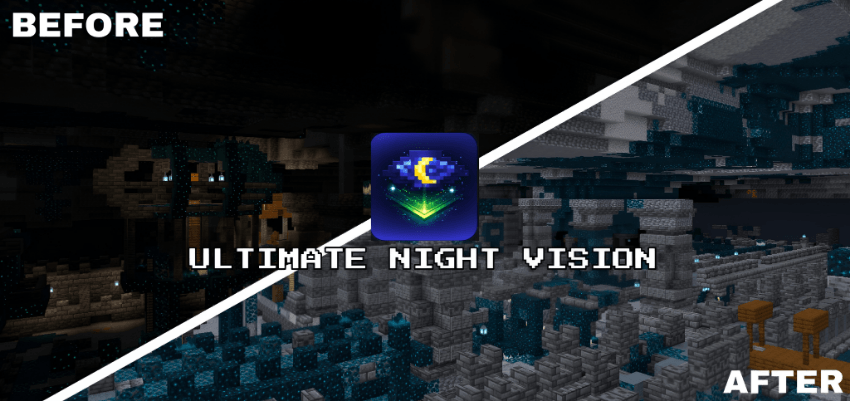
It works in every graphics mode (Simple, Fancy and Vibrant Visuals) and looks its best with Vibrant Visuals turned on.
🌙 Features
- Clear, balanced night vision with no harsh colours or overexposure
- No Night Vision potion, commands or extra settings needed
- Built for caves, the Deep Dark and underground exploration
- Clear fog in all 94 biomes in Simple & Fancy mode, plus a catch-all so new biomes are never missed
- Brighter Vibrant Visuals lighting in all 16 biome lighting sets, including the Nether, the End and the new Ice Caves
- Thick Ice Caves fog cleared so you can actually see inside them
- Pumpkin blur and screen vignette removed for a clearer view
🎨 Graphics Mode Support
Ultimate Night Vision includes a separate subpack for each graphics mode:
- Simple & Fancy Graphics. A light HUD night vision filter, combined with clear per-biome fog for long sightlines.
- Vibrant Visuals (recommended). Raises ambient brightness through Vibrant Visuals' own lighting system, so dark areas become readable while shadows and lighting still look natural.
👉 Pick the subpack that matches your Video → Graphics Mode setting before playing.
💡 Tip: For the brightest caves, use Vibrant Visuals. In Simple & Fancy, the pack clears fog and adds a light filter but doesn't change the game's lighting, so very dark caves stay darker there.
⚙ Installation
- Download the
.mcpackfile - Open it, and Minecraft will import it automatically
- Activate it in Global Resources or in a world's Resource Packs
- Tap the pack and select the subpack that matches your graphics mode
🛠 Compatibility
- Minecraft Bedrock Edition 1.21.90 or newer
- Android, iOS/iPadOS, Windows 10/11, Xbox, PlayStation
- Works in single-player, on servers and on Realms
- No experimental features required
The Ultimate Night Vision Team