


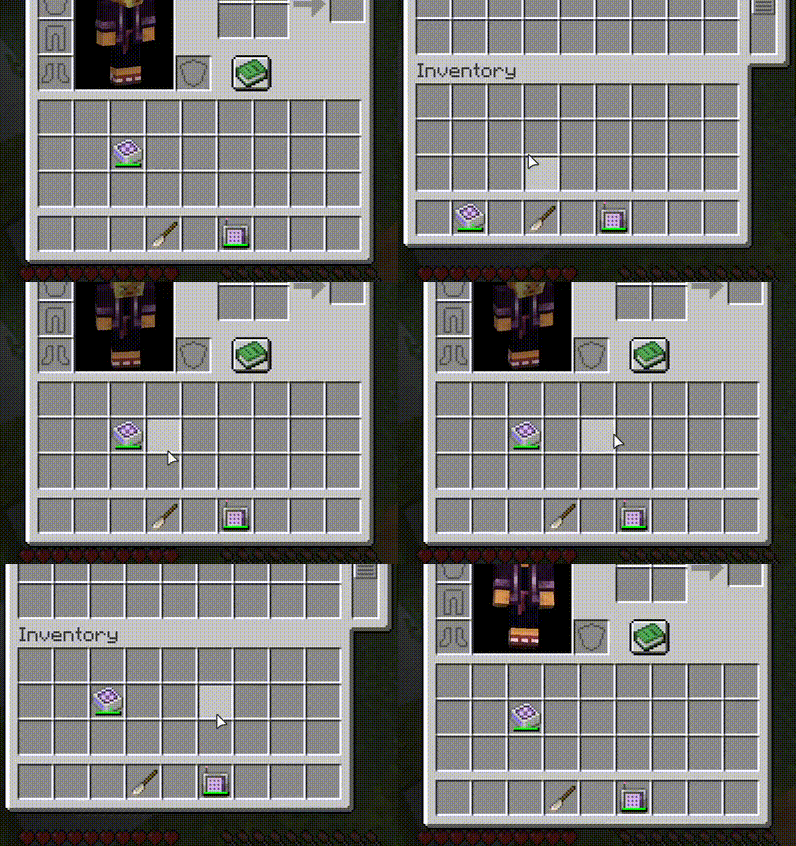
open-in-inv.gif
Description
Open In Inventory
Open guidebooks, backpacks, terminals and handheld tools with a single click in your inventory.
No more hunting for a free hotbar slot or manually swapping items when your hotbar is full, hover over a supported item in any inventory screen and right-click it: Open In Inventory briefly swaps it into your hand, uses it, and automatically puts it back when you close the screen.
Features
- One right-click in any container screen: Works in your own inventory, chests, barrels, shulker boxes, modded machines, basically anywhere the player inventory is visible.
- Nothing gets moved permanently: The item is swapped in, used, and swapped back to the exact same slot. Your hotbar selection, items on the cursor and the rest of the inventory are left untouched.
- Shift is respected: Hold shift while right-clicking and the mod stays out of the way, so normal shift-click behaviour still works.
- Tooltip: Supported items show a
Right Click to openline while the inventory screen is open, so you can tell at a glance what can be used this way. - Works out of the box with popular mods, including Patchouli guide books, Refined Storage and AE2 wireless terminals, Scannable, Extended Crafting, Crafting on a Stick, and vanilla written books, as of 2.0.2.
- Easy extension: Add any item you want with one in-game command, or bulk-add families of items with templates such as
example:{color}_backpackin config.
The mod is client-side: it adds no blocks, items or network packets, so you can join any server without it being installed there. Servers may install it too; it will simply stay inactive.
How it works
While an inventory screen is open and you right-clicked, Open In Inventory checks what you are hovering over. If there's builtin or configured support for it:
- the item is swapped with your currently selected hotbar slot,
- after a short delay (3 ticks by default) the item is used, and
- when the screen closes, your inventory is reopened and the item is swapped back to where it came from.
Built-in support
These are supported without any additional configuration:
| Source | Items |
|---|---|
| Vanilla | Written Book, Book and Quill |
| Patchouli | Every guide book |
| Refined Storage | Portable and wireless grids (item, fluid, crafting, autocrafting), including creative variants |
| Applied Energistics 2 | Wireless terminal, wireless crafting terminal, portable item/fluid cells, cutting knives (used while sneaking) |
| Scannable | Scanner (used while sneaking) |
| Extended Crafting | Handheld Table |
| Crafting on a Stick | Crafting Table, Loom, Grindstone, Cartography Table, Stonecutter, Smithing Table, Anvil (all damage states) |
Adding your own items
The easiest way is the in-game command. Hold the item you want to support and run:
/open-in-inventory addThis appends your main-hand item to enabled_items. Useful variants:
| Command | What it does |
|---|---|
/open-in-inventory add --hotbar |
Add every valid stack in your hotbar at once. |
/open-in-inventory add --wildcard |
Match by item only, ignoring NBT/components (e.g. any written book). |
/open-in-inventory add --sneak |
Use the item while sneaking. |
/open-in-inventory add --show |
Print the generated JSON instead of saving it. |
/open-in-inventory hand |
Preview the main-hand entry without saving it. |
/open-in-inventory hotbar |
Preview hotbar entries without saving them. |
/open-in-inventory refresh |
Reload the config and rebuild the item list. |
--wildcard and --sneak also have the short forms -w and -s.
NOTE: You can add arbitrarily many args when using add command, for example:
/open-in-inventory add --hotbar --wildcardLicense
The Open In Inventory Team
