promotional bannermobile promotional banner
Discord Chat Plugin logo

Discord Chat Plugin

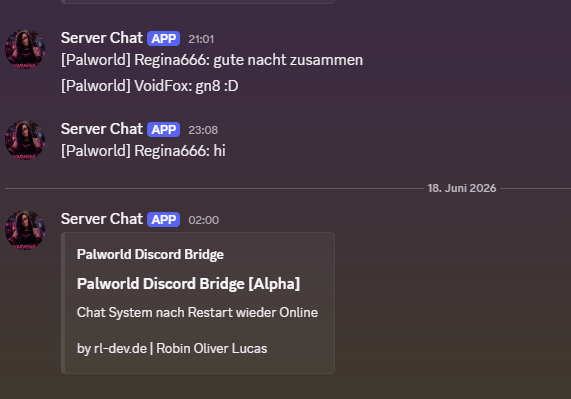
Server Mod : Post your inGame Chat in to Discord
item image

Screenshot 2026-06-18 024211.png

Description

PalworldDiscordPlugin

A Discord bridge plugin for Palworld dedicated servers using UE4SS (Unreal Engine 4/5 Scripting System).

Bridges in-game chat, join, leave and death events to a Discord webhook.


Features

  • Chat bridge - Player chat messages forwarded to Discord
  • Event notifications - Join, leave and death events as Discord embeds
  • Configurable events - Toggle each event type on/off in config
  • Custom bot name - Set the Discord webhook bot name
  • File-based IPC - Reliable Lua <-> C++ communication
  • Debug logging - Detailed logs for troubleshooting

Requirements

  • Palworld dedicated server (Windows)
  • UE4SS installed in Pal/Binaries/Win64/

Installation

  1. Stop your Palworld server

  2. Download and extract the ZIP into your server directory:

    Pal/Binaries/Win64/
    

    The ZIP contains:

    • PalworldDiscordPlugin.dll (root plugin)
    • ue4ss/Mods/PalworldDiscordBridge/ (UE4SS Lua mod)
  3. Create your Discord webhook:

    • Open Discord server settings
    • Go to IntegrationsWebhooks
    • Click New Webhook, choose channel
    • Click Copy Webhook URL
  4. Configure the plugin:

  5. Start the server

  6. Verify - Send a chat message in-game and check Discord


Configuration

See CONFIG.md for the full configuration reference.

Quick config (config.json)

{
  "discord": {
    "webhook_url": "YOUR_WEBHOOK_URL_HERE",
    "bot_name": "Server Chat"
  },
  "events": {
    "chat": true,
    "join": true,
    "leave": true,
    "death": true
  }
}
Field Description
webhook_url Your Discord webhook URL (required!)
bot_name Name shown in Discord for chat messages
events.chat Forward player chat to Discord
events.join Send join embeds (currently disabled due to disconnects)
events.leave Send leave embeds
events.death Send death embeds

Troubleshooting

No messages in Discord

  1. Check Pal/Binaries/Win64/PalworldDiscordPlugin.log for errors
  2. Verify your webhook URL is correct in config.json
  3. Ensure debug_mode is true for detailed logs
  4. Check the server console for [PalworldDiscordPlugin] output

Server crashes on join

The join hook is disabled by default. Do not enable it - it causes disconnects on current Palworld versions.

Bot shows player name instead of "Server Chat"

Edit bot_name in config.json and restart.


File Structure

Pal/Binaries/Win64/
├── PalworldDiscordPlugin.dll          (main plugin DLL)
├── PalworldDiscordPlugin.log          (log file)
├── CONFIG.md                          (configuration guide)
├── README.md                          (this file)
└── ue4ss/
    └── Mods/
        └── PalworldDiscordBridge/
            ├── mod.txt
            ├── Scripts/
            │   └── main.lua           (UE4SS Lua bridge)
            └── dlls/
                ├── PalworldDiscordPlugin.dll
                └── config.json        (plugin configuration)

Note : You must activate the mod in the Mods.txt from UE4SS Mods folder.


Credits

Made by rl-dev.de | Robin Oliver Lucas

The Discord Chat Plugin Team

profile avatar
Owner
  • 1
    Followers
  • 20
    Projects
  • 90.6K
    Downloads