PAK Converter
A simple tool that converts "Steam" .pak mods into ready to use files for the "PC Game Pass" version of Palworld.
Background.jpg
How_to_use.png
Description

Description:
If you play Palworld through PC Game Pass (Xbox app), you already know the pain: most .pak mods are built for the Steam version and simply won't load on the PC Game Pass version. This tool fixes that.
PAK Converter is a simple batch tool that converts .pak mods made for the Steam version of Palworld so they also work on the PC Game Pass version (Xbox app). Drop your mods in the Input folder, run the tool, and a few seconds later you'll have converted files ready to copy into your game. That's it. No commands, no setup, no headaches.
The script uses retoc to generate the complete package set (.pak, .ucas, and .utoc) required by the PC Game Pass version.
A quick thank you to trumank and Archengius, the creators of retoc (https://github.com/trumank/retoc). PAK Converter is really just a friendly wrapper around his work, all the heavy lifting of converting Legacy .pak files to the Zen format happens inside retoc itself. This tool would not have been possible without it. If you find this useful, go give his repo some love too.
Main features:
- Converts any number of .pak mods in one run, no need to do them one by one
- Clear per file feedback: OK or FAILED, so you always know what happened
- Only processes .pak files, anything else in the Input folder is ignored automatically
- Original files are never modified
- Clear on screen warnings if retoc or your mod files are missing, telling you exactly what to fix
- Automatically creates all required folders on first run
- No installation, no dependencies beyond retoc, fully portable
Available downloads:
Two download options, choose the one you prefer:
- All in One: comes with retoc already included and ready to go. Just extract and run, no extra downloads needed.
- Script Only: does not include retoc. Use this version if you prefer to download retoc yourself directly from its official GitHub page, for example to verify the source before running it.
Requirements:
- retoc by trumank and Archengius
Already included if you downloaded the All in One version. If you downloaded Script Only, get it from https://github.com/trumank/retoc and place retoc.exe inside the "retoc" folder that comes with this tool.
Instructions:
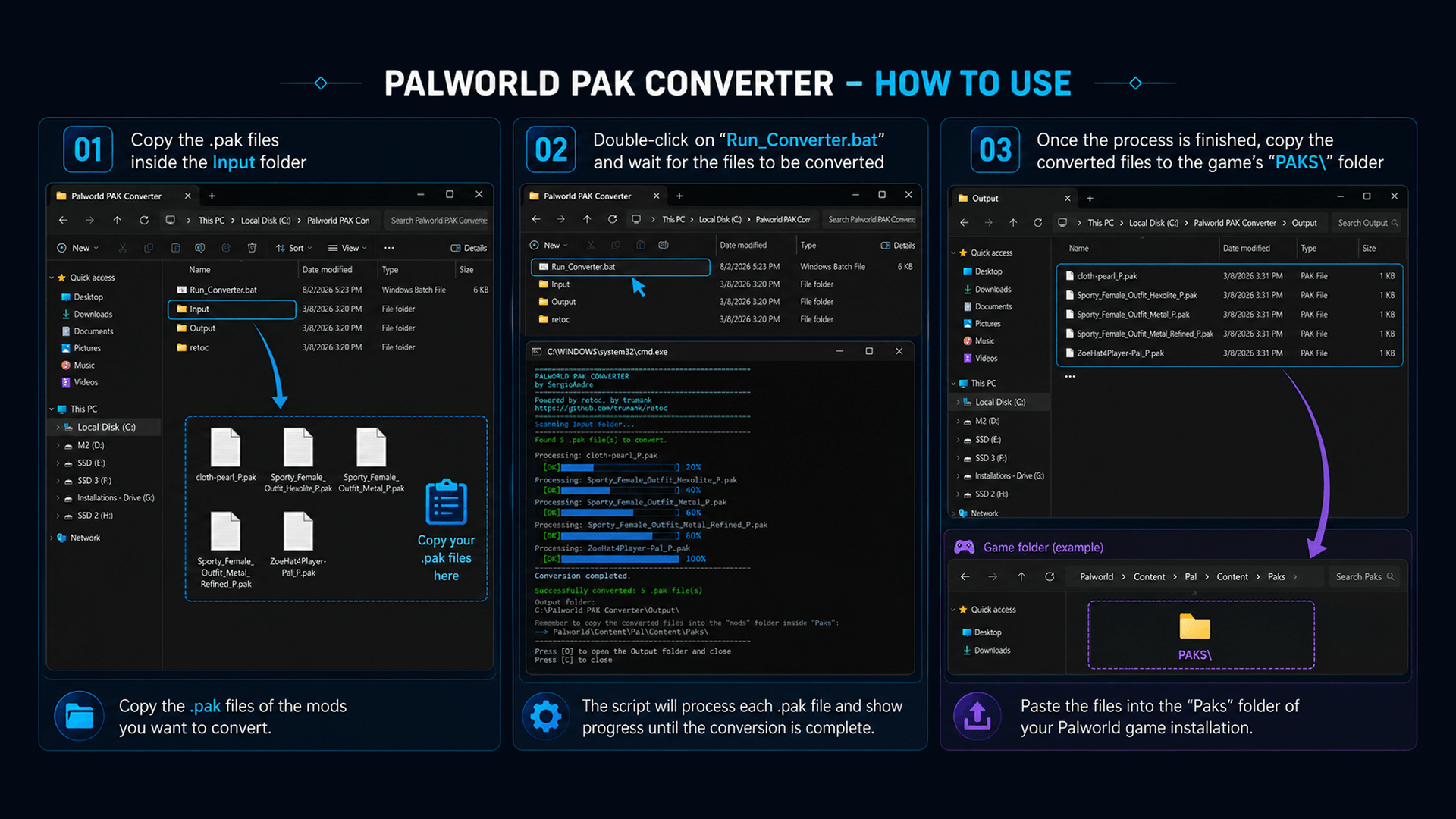
- 1. Download and extract PAK Converter anywhere on your PC. It doesn't need to be inside the game folder.
- 2. If you downloaded the Script Only version, download retoc and place retoc.exe inside the "retoc" folder. Skip this step if you downloaded All in One.
- 3. Copy the .pak mod files you want to convert into the "Input" folder.
It should look like this before running:
Palworld_PAK_Converter\Run_Converter.bat
Palworld_PAK_Converter\retoc\retoc.exe
Palworld_PAK_Converter\Input\YourMod.pak- 4. Double click “Run_Converter.bat”.
- 5. Once it's done, open the "Output" folder and copy the converted files into "...\Pal\Content\Paks\", or wherever the original mod's instructions say to put them.
If a file fails to convert:
Sometimes a specific mod will show FAILED instead of OK. This is not something PAK Converter can fix on its own, since the actual conversion work happens inside retoc. A few possible reasons:
If a fresh download still fails, the issue is with that specific mod file, not with this tool. In that case, your best option is reaching out to the mod's own creator, they'll know their file better than anyone.
- The download is corrupted or incomplete. Try downloading the mod again.
- The .pak file isn't actually a Legacy .pak in the format retoc expects (for example, it was already converted, or retoc can't recognize its internal version).
- The mod's internal packaging has something retoc's current version cannot read. This happens with some older or unusually packed mods and is outside this tool's control.
Uninstall:
- Just delete the Palworld_PAK_Converter folder. It doesn't touch any game files or write anything outside its own folder.
Shout outs:
- retoc by trumank and Archengius, the tool that makes the actual Legacy to Zen conversion possible.
Changelog:
1.0
Initial release. Batch conversion of .pak mods to Zen/IoStore format for the Palworld Game Pass version, with per file progress, error reporting and automatic output folder handling.
The PAK Converter Team