
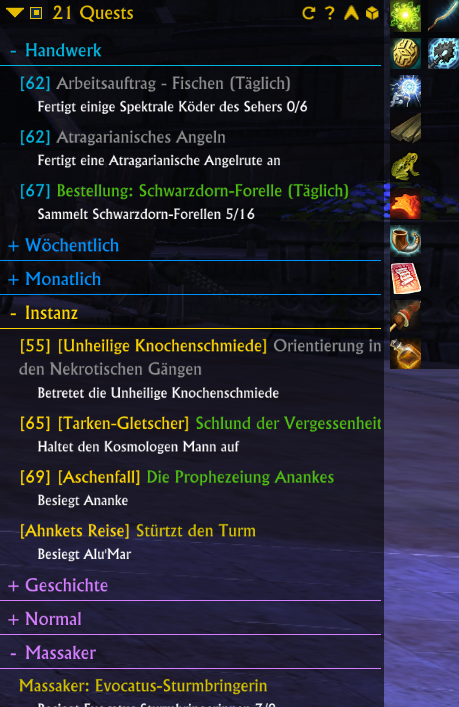
The new layout of the quest tracker window
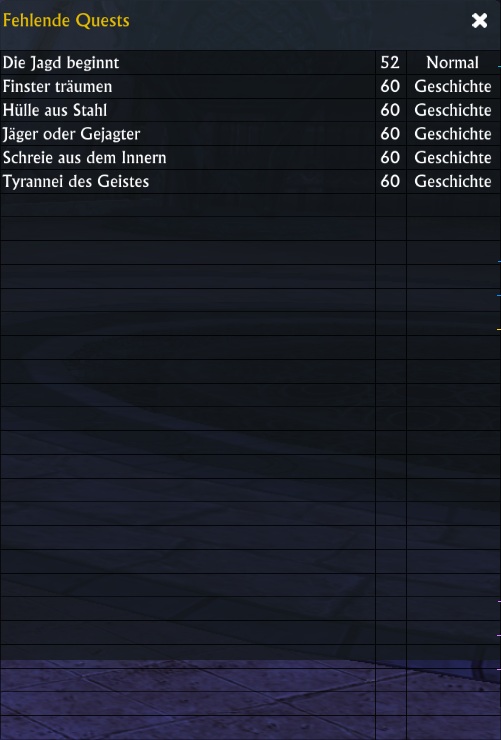
The UI part showing missing quests
Description
nkQuestTracker is a replacement for the standard quest tracker. It lists all quests in a scrollable list which of course can be moved to wherever you want on the screen. The header of the quest tracker can be disabled in the configuration. It is also possible to auto hide the quest tracker body after 5 seconds.
This addon features some advanced features over the default quest tracker:
You can have a separate window for area quests like zone events, instant adventure objectives, etc.
- It lists all quests you have (not only 6 or were it 5?)
- quests are grouped in logical categories like crafting, world, event, etc.
- quests are ordered by name within a category
- categories can be collapsed by clicking on them (saved during sessions)
- all quests within a category can be abandoned by simply right clicking and choosing the entry in the context menu
- Quest can be collapsed by clicking on the header (state is saved between sessions)
- You can open a small menu to track, abandon and share quests by right-clicking a quest title
- There's a tooltip for each quest
- You can change a lot of visual aspects in the config (font sizes, font colors)
- The quest tracker window can be collapsed by itself, moved anywhere on the screen and resized (simple mouse of the bottom right corner and drag the window)
- You can choose to not show certain quest categories (We are all annoyed by that world events aren't we?)
- You can filter the current quest list by the current zone (Click on the arrow icon in the header)
- nkPanel plugin of course
But there's even more!
- You can get a list of quests you haven't yet completed in the current zone by clicking on an icon in the quest log header
- There's support for quests items needed during a quest
IMPORTANT:
The Rift API is quite limited. Therefore some workarounds are needed.
All quest items the addon can identify will be displayed to the right of the QuestTracker. If you need to use one simply click on it. The addon will move the item from the quest item store to your bags (make sure you have at least one free space). After this it can be used by the addon.
Once you activate a quest item it will be display to the left of the quest tracker window. Now you can click on that icon to use the quest item.
It's a bit complicated but don't blame me. You can't even blame Gamigo ...it's been this way all the way back when Trion was still in charge.
The nkQuestTracker Team
