


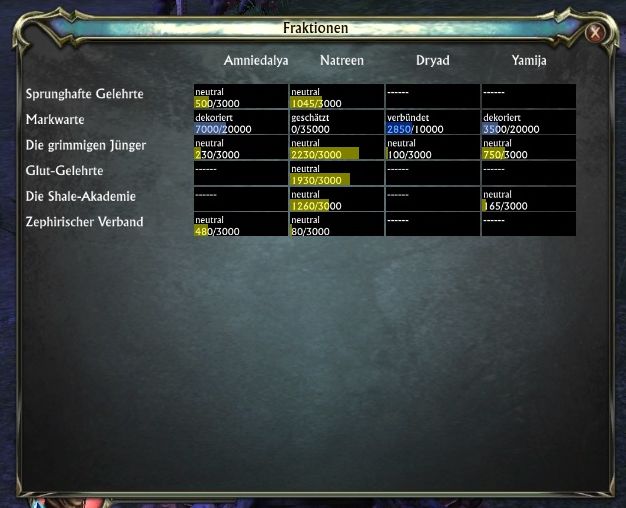
The window that shows which of your toons has which notoriety with which faction.
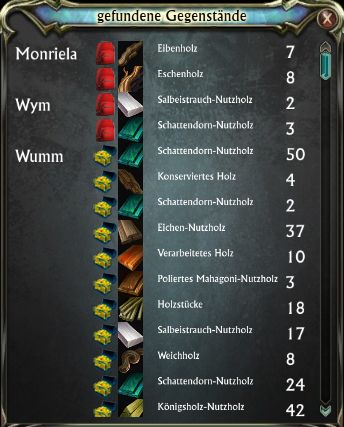
This window opens when you click the magnifying glass, or press return after entering some text in the search window. It shows your toons (on the same shard), the type and amount of the items they have which match your search, and whether they are in...
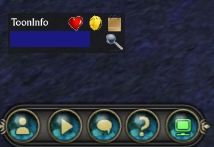
This is ToonInfo's main window. It's small and unobtrusive and can be moved to just about anywhere where it won't be in your way.
Click on the heart symbol to open the faction notoriety window. Click on the coin to open the currency window. En...
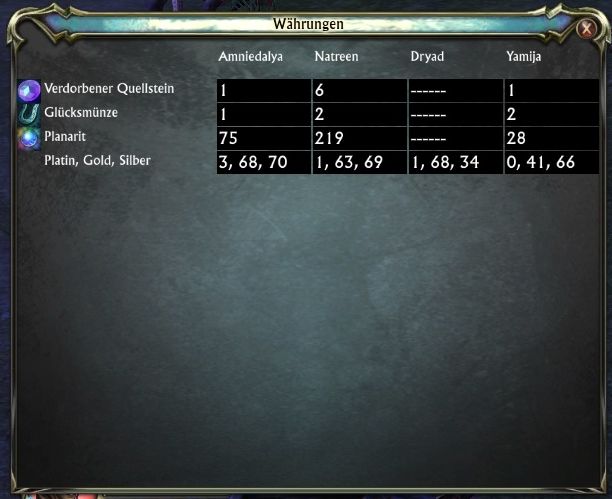
This shows which of your toons has how much of which currency.
Description
Addon description
ToonInfo keeps track of your toon's and guild's inventories, and allows you to search quickly for any item you know has been around somewhere.
When you mouseover an item or item type, you get a tooltip next to the Tooninfo window that shows you how many items of this type each of your toon owns. (You can use /ti tooltipattach true to move the extra tooltip next to the standard tooltip, but that doesn't work well because the extra tooltip gets hidden behind other windows. Use /ti tooltipattach false to reset to normal behaviour). Also, you can see how much of each type of currency your toons have (click the coin icon on the main window), and which notoriety your toons have with which factions (click the heart icon).
The tooltip and the search result window normally show one row per bag slot. You can change this by using /ti merge 1 to combine all slots of equal type together, or /ti merge 2 to merge everything (bank and bags). /ti merge 0 resets to the standard behaviour.
Craft recipes and artifacts would be nice, but aren't supported by API yet. These will be added as soon as i can.
Slash commands
- /ti merge 0 - don't merge inventory slots at all (default)
- /ti merge 1 - merge same type inventory slots
- /ti merge 2 - merge all inventory slots
- /ti tooltipattach true - attach the extra tooltip to the standard one (warning, the extra tooltip gets hidden behind other windows sometimes)
- /ti tooltipattach false - attach the extra tooltip to the main tooninfo window (default)
- /ti attachposition {auto, top, bottom, leftup, leftdown, rightup, rightdown} - control where the extra tooltip gets displayed and which direction it grows
- /ti delete <toon name> - delete all info about that toon after you deleted him or a server transfer
The ToonInfo Team
