


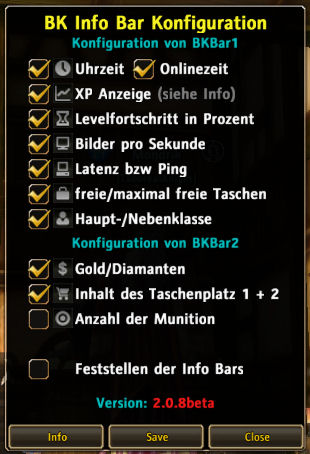
The Configmenu

The BKInfoBar
BKInfoBar in the AddonManager
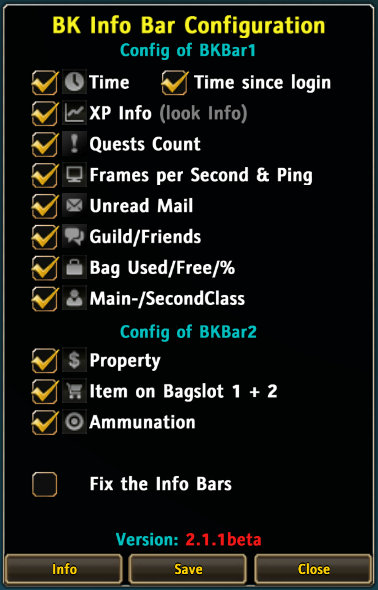
GUI

BKInfoBar
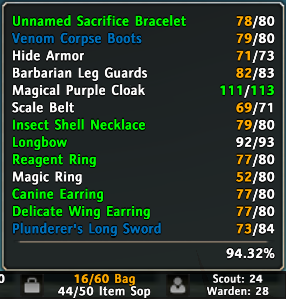
Class-Dura

Bar2

BKInfoBar Screenshot
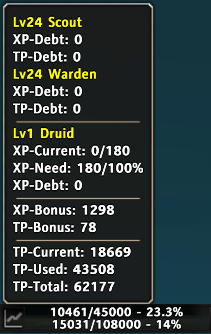
EXP
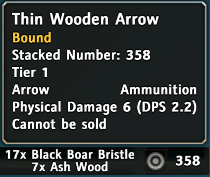
Ammo

Bar1

BKInfoBar Screenshot

BKInfoBar Screenshot

BKInfoBar Screenshot

Logo
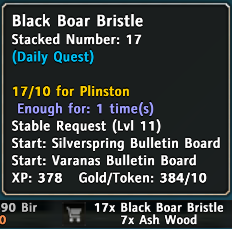
Item

BKInfoBar Screenshot
Description

The easiest and smallest information bar.
Features
General
- You can use Left-Drag to move two of the bars to anywhere.
- The two bars can also be fixed in its offset.
- Hide/Show each information.
- Colored progress in Ammo, Debt, Bag, FPS, Ping, Daily.
- Config Button
- Left-Click to shows GUI.
- Shift + Left-Drag to move.
- Support for AddonManager.
Bar1

- Time: Clock (Online Time) \ Weekday Month/Date - Year
- Left-Click to open the WorldMap.
- Right-Click to change 12/24 format.
- EXP: Primary Class EXP \ Secondary Class EXP
- Mouse over to show TP, EXP bonus, three classes EXP debt.

- Left-Click to open the Skill Book.
- Right-Click to change EXP format.
- Format: Current/Max - % \ Current - % \ Need/Max - % \ Need - %
- Quest: Daily Quest Count \ Finished/Accepted Quests
- Left-Click to open the Quest Log.
- Right-Click to open the World Search.
- System: FPS \ Ping
- Mail: Unread Mail
- Left-Click to open the Postbox.
- Right-Click to open the Rental Management.
- Social: Guild Members \ Friends
- Left-Click to open the GuildFrame.
- Right-Click to open the SocialFrame.
- Bag: Backpack \ Item Shop Backpack
- Left-Click to preview Bank.
- Right-Click to change Bag format.
- Format: Used/Max Slots \ Free/Max Slots \ %
- Class: Primary Class \ Secondary Class
- Mouse over to show Equipment Dura.

- Left-Click to open the CharacterFrame.
- Right-Click to open the Item Set Skill.
Bar2

- Money: Gold | Phirius Token Coin
Diamonds | Ruby | Ancient Memento (Bag and Bank) | Phirius Shell (Bag and Bank)
- Item: Item in Bagpack Slot 1 \ Item in Bagpack Slot 2
- Mouse over to show Tooltip of item.

- Ammo: Ammunition Count (Bag and Equip)
- Mouse over to show Tooltip of ammunition.

- Left-Click to swap equipment.
Slash Command
- /bkc or /bkconf - Open GUI.
- /bkhelp - Show help message.
Installation
- Unzip the file.
- Copy BKInfoBar folder to ...\Runes of Magic\Interface\AddOns.
- Make sure the file structure is as follows:
- Interface
- AddOns
- BKInfoBar
+ Locales
+ Textures
· BKInfoBar.xml
· BKInfoBar.toc
· BKInfoBar.lua
Thanks
Taren (TdOTime, TdSys), aveng3r (KXP), Frode789 (Idea of color FPS & Ping)
Axialis Team (Icons, release under CC 2.5).
Do you have problem?
- Please read Addon Teaching first.
- Please report bug at Tickets.
ToDo
- Make a config to fix it in the bottom or top.
The BK Info Bar Team

