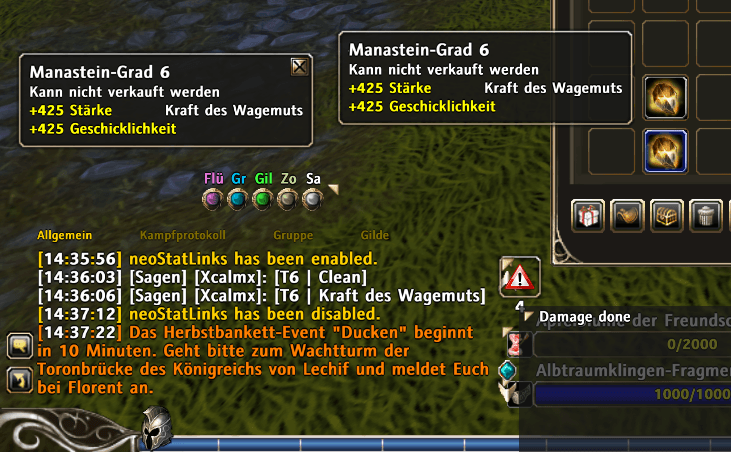
Instead of "[Manastein-Grad 6]" (german client) now you can see "[T6 | Kraft des Wagemuts]" or "[T6| Clean]".
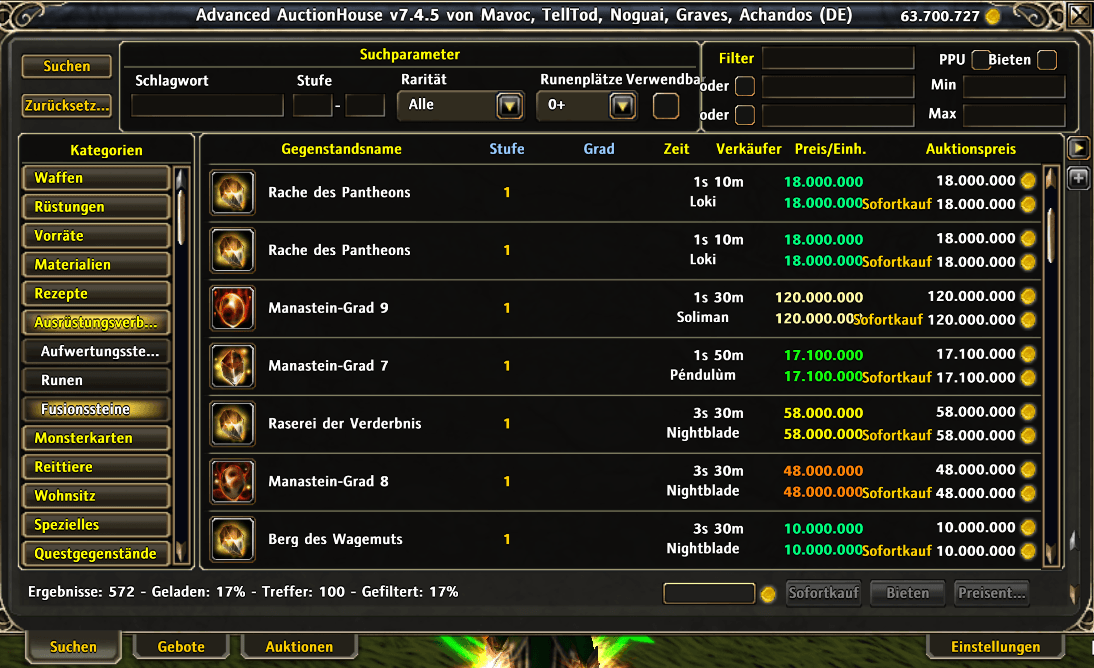
You can now see the names of the stats of the mana stones in the auction house.
Description
neoStatLinks
neoStatLinks automatically enhances link formatting of Mana Stones in RoM clients by intelligently rewriting structured links with clearer, more informative text. Transform complex encoded links into readable formats that show tier and attribute information at a glance. This is a rewrite of StatLinks by Zhur.
✨ Key Features
- 🔗 Automatic Link Rewriting - Automatically processes and enhances links as they're generated
- 📊 Tier Display - Shows tier information in an easy-to-read format
- 🏷️ Attribute Labeling - Displays attribute names instead of encoded values
- 🏪 Auction House Integration - Enhances auction browse lists by showing stat names directly in the item listings for Mana Stones and other stat items
- 🔄 Smart Detection - Automatically identifies and processes specific link types
- 🐛 Debug Mode - Built-in debugging tools for troubleshooting
- ⚙️ Lightweight - Minimal performance impact with efficient processing
- 💾 Persistent Settings - Your preferences are saved between sessions
🚀 Getting Started
- Install the addon by extracting it to your
interface/addons/folder - Reload your UI or restart the application
- The addon will automatically start processing links
No configuration required! It works out of the box with sensible defaults.
💬 Commands
All commands can be accessed via /neoStatLinks or the shorter /nsl:
Basic Commands
/nslor/neoStatLinks- Show help information/nsl toggle- Enable or disable the addon/nsl debug- Toggle debug mode for troubleshooting
🎯 What It Does
neoStatLinks intercepts structured link formats and rewrites them to be more informative. Instead of seeing generic link text, you'll see formatted information like:
Before: [Mana Stone Tier 6]
After: [T6 | Triumph of Bravado] or [T6 | Clean]
The format [T{tier} | {attribute}] makes it immediately clear what tier and attribute the link represents, making communication and organization much easier.
Auction House Enhancement
When browsing the auction house (with AAH addon installed), the item listings are automatically enhanced:
- Mana Stones: Display shows just the stat name instead of the generic item name, so you can quickly see what stat each stone has at a glance
- Other Stat Items: Shows the item name followed by the stat name (e.g., "Item Name: Stat Name") for quick identification
This makes browsing and searching for specific items much faster and more efficient!
⚙️ How It Works
The addon uses advanced pattern matching to parse structured link formats and extract:
- Item identifiers
- Tier information
- Attribute data
- Metadata and properties
It then rewrites the display text to show this information in a compact, readable format.
🔧 Configuration
Settings
The addon has two main settings:
- Enabled: Turn the addon on or off
- Debug: Enable detailed logging for troubleshooting
Slash Commands
Toggle the addon:
/nsl toggle
Enable debug mode to see detailed processing information:
/nsl debug
All settings are automatically saved and persist between sessions.
🔌 Compatibility
- Optional Dependency: Works with
pylibfor enhanced hook management (automatically detects if available) - AAH Integration: Automatically integrates with AAH (Auction House Addon) to enhance browse listings - supports both older and newer AAH versions
- Fallback Support: Gracefully degrades to direct hooking if optional dependencies aren't present
- AddonManager: Compatible with AddonManager if installed
🐛 Troubleshooting
Debug Mode
If links aren't being processed correctly, enable debug mode:
/nsl debug
This will show detailed information about:
- Link parsing attempts
- Pattern matching results
- Attribute extraction
- Rewriting operations
Common Issues
- Links not being rewritten: Ensure the addon is enabled (
/nsl toggle) - Performance concerns: Debug mode adds overhead; disable when not troubleshooting
- Missing dependencies: The addon works without optional dependencies, but some features may use fallback methods
📋 Technical Details
Link Processing
The addon implements multiple parsing strategies with progressive fallback:
- Full pattern matching with color encoding
- Pattern matching without color
- Simplified vendor link format
- Color-only variant
This ensures compatibility with various link formats you might encounter.
Performance
- Conditional debug output (no overhead when disabled)
- Optimized pattern matching (tries common formats first)
- Event-driven architecture (only active when needed)
- Minimal memory footprint
📦 Installation
- Download the latest release
- Extract the
neoStatLinksfolder to yourinterface/addons/directory - Reload your UI or restart the application
- Start using enhanced links immediately!
📝 Files Included
neoStatLinks.lua- Main addon codeneoStatLinks.xml- UI frame definitionsneoStatLinks.toc- Addon metadataREADME.md- Detailed technical documentationLICENSE.txt- MIT License
🛡️ License
MIT License - Do whatever you want but don't sue me. See LICENSE.txt for full details.
👤 Author
Xcalmx
📈 Version
Current Version: 0.1
For bug reports or feature requests, please use the comments section.
The neoStatLinks Team