• Browse
    Browse all (125)
    • iconMinecraft
    • iconThe Sims 4
    • iconWorld of Warcraft
    • iconMinecraft Bedrock
    • iconArk Survival Ascended
    • iconHytale
    • iconinZOI
    • iconStarCraft II
    • iconKerbal Space Program
    • iconStardew Valley
    • iconAmerican Truck Simulator
    • iconHogwarts Legacy
    • iconTerraria
    • iconWildStar
    • iconPalworld
    • iconWorld of Tanks
    • iconRunes of Magic
    • iconRift
  • Create
    MOD AUTHORS
    • Become an Author
    • Start a Project
    • Project Submission Guide
    MODDING TOOL DEVELOPERS
    • Apply for an API Key
    • Documentation
    • Terms & Conditions
    SOCIAL
    • Join Our Discord!
    • Authors Discord
  • Studios
    GAME DEVELOPERS
    • Unlock Modding for Your Game
    • Documentation
  • Help Center
  • Our Blog
  • Surprise me
  • legacy flameLegacy
  • Go Premium
  • Get CurseForge App
  • Help Center
  • Our Blog
  • Surprise me
  • legacy flameLegacy
Modvengers, assemble!
  • Home
  • Runes of Magic
  • Addons
  • ZZInfoBar v3
ZZInfoBar v3 logo

ZZInfoBar v3

  • By
    _ForgeUser7305846_ForgeUser7305846
  • Addons
ZZInfoBar is a addon that displays a bar with status information. It has been designed to be as easy to use as possible.
Install via App

Details

Downloads
32,197
Created
1 decade ago
Updated
1 decade ago
Project ID
30728
License
Creative Commons BY-NC-ND 3.0

Game Versions

    5.0.95.0.14.0.114.0.2.24404.0.0.2413

informative placeholder

Categories

  • HUDs
  • Quests & Leveling

Links

Localization

Main File

5.0.9

3.0.2
Latest release
  • R
  • Apr 30, 2014

Recent FilesView all

Game

3.0.2
Latest release
  • R
  • Apr 30, 2014
3.0.0_RC5
Latest release
  • B
  • Apr 9, 2014
3.0.0_RC1-1-gfabab42
Latest release
  • A
  • Oct 8, 2013

  • Description
  • Comments
  • Files
  • Gallery (6)
  • Relations
  • Issues
  • Screenshot thumbnail

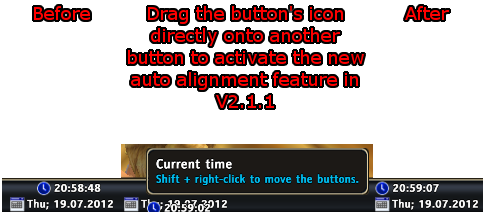
    Drag buttons onto another one to activate the new auto alignment in V.2.1.1

  • Screenshot thumbnail

    Place the Buttons the way you like

  • Screenshot thumbnail

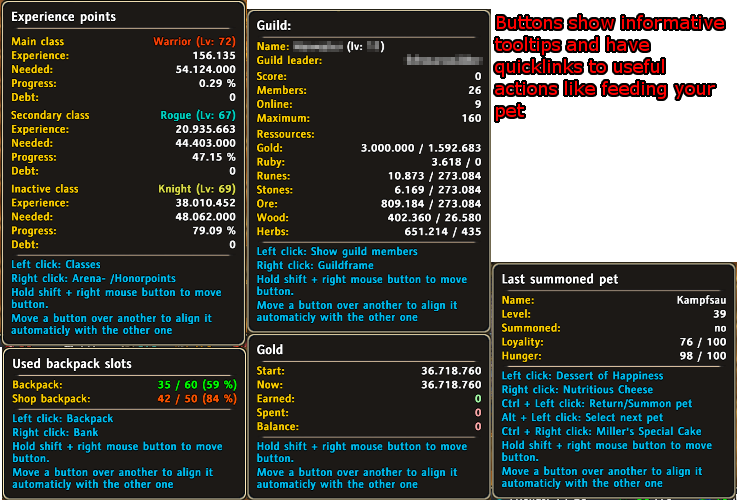
    Buttons show tooltips on mouseover (screen from V2.2)

  • Screenshot thumbnail

    Use "Move the rest of the UI"! No need to struggle with blocked interface elements.

  • Screenshot thumbnail

    The customizable bar that holds dynamically created buttons
  • Screenshot thumbnail

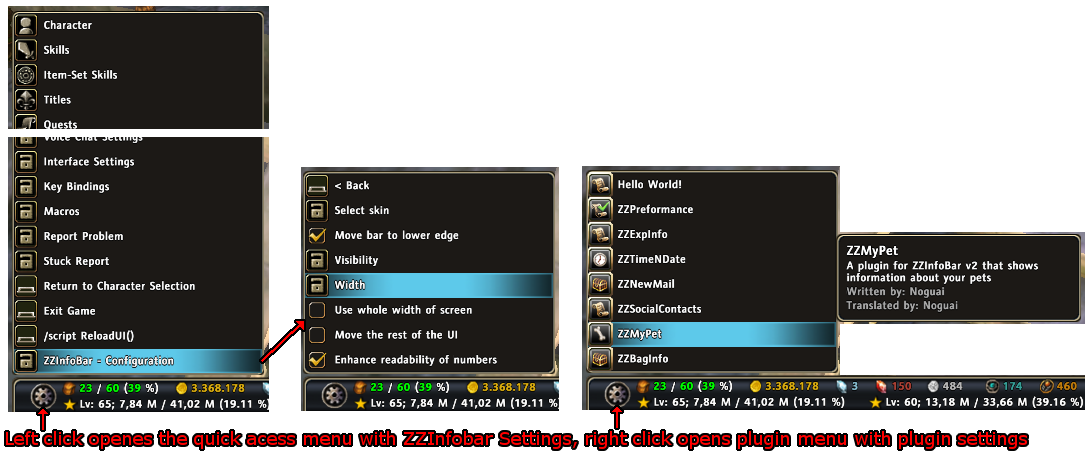
    Dropdowns make even more information and functions quickly acessible

Install via App
CurseForge - a world of endless gaming possibilities for modders and gamers alike.
Download the best mods and addons!
  • Games
    • All games
    • Minecraft
    • World of Warcraft
    • The Sims 4
    • Starcraft II
    • Kerbal Space Program
    • Minecraft Dungeons
    • World of Tanks
  • Create
    • Start a project
    • Project submission guide
    • Author Rewards Program
    • Apply for an API Key
    • 3rd Party API T&C
  • Community
    • Join Our Discord!
    • Ideas Portal
    • CF blog
    • Newsletter
    • Roadmap
    • Bukkit forums
    • CurseForge Servers
  • Support
    • Knowledge base
    • Troubleshooting
    • Contact us
  • Companions
    • Overwolf
    • CurseForge for Studios
    • Tebex
    • Nitro
  • Terms of Service
  • Privacy Policy
  • Licenses
  • Mod Author Terms
© 2026 Overwolf. All rights reserved.