Improved Hotbar
Description
Improved Hotbar
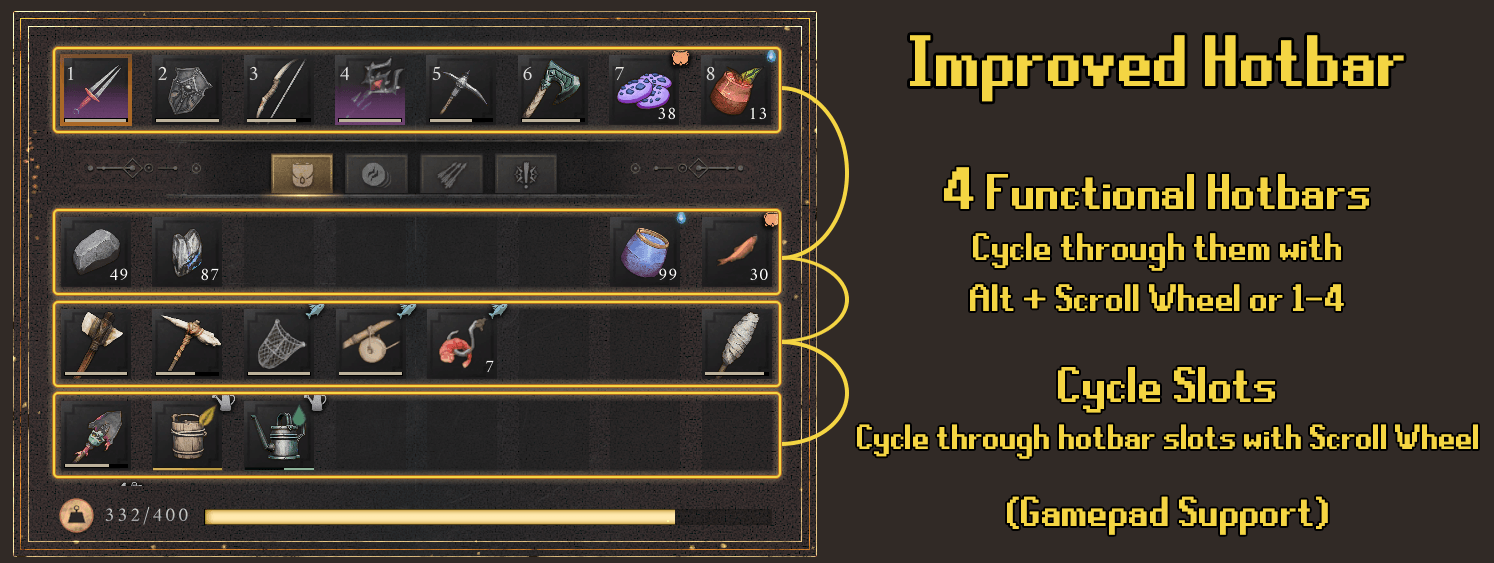
Turns your other inventory rows into functional hotbars and also enables cycling of hotbar slots with scroll wheel/dpad.
Allows you to have multiple MMO-style hotbars by scrolling through the rows of the inventory with Alt + Scroll/1-4.
(All keybinds configurable)
How it works:
The games default hotbar uses the first 8 slots of your inventory.
This mod takes the next few 8-slot rows in your inventory and treats them as extra hotbars.
When you switch hotbars, the mod physically swaps the items between rows using the games normal item-moving system.
DEFAULT CONTROLS:
  Mouse & Keyboard:
  - Mouse Wheel Up/Down : Cycle through hotbar slots 1-8
  - Alt + Wheel Up      : Previous hotbar row
  - Alt + Wheel Down    : Next hotbar row
  - Alt + 1-4           : Direct jump to Hotbar 1, 2, 3, or 4

  Gamepad / Controller:
  - D-Pad Right/Left : Cycle through hotbar slots
  - Hold Right Stick (R3) + D-Pad Right : Next hotbar
  - Hold Right Stick (R3) + D-Pad Left  : Previous hotbar
Mod Menu Support: All config settings can be adjusted live in-game with the Mod Menu/Settings Mod
If installed, press Pause -> Mods -> Improved Hotbar.
Expanded Inventory Support: Supports up to 72 slots / 8 hotbar rows with the Expanded Inventory Mod
If installed, change 'MaxHotbars' from 4 to 8 in the config.
How to install:
Download and extract UE4SS_v3.0.1.zip, move extracted folder into RSDragonwilds\RSDragonwilds\Binaries\Win64\
Download and extract ImprovedHotbar.zip, move extracted folder into RSDragonwilds\RSDragonwilds\Binaries\Win64\ue4ss\Mods\
The Improved Hotbar Team