


Quest Log
Quest Log
The game's map has a quest list, but it only shows the quests you are on and the ones you have finished. It cannot show you the quests you have not started, what the steps of a quest are, or where to go to begin one. This does, in one window, in the game's own style.
What you get
- Every quest in the game: in progress, not started, completed, or all of them, with a count on each tab
- The list on the left and the quest you picked on the right, so you can read any quest without losing your place
- The real steps of each quest, in the game's own words: the ones behind you ticked, the one you are on highlighted, and "step 7 of 11" in the list
- Steps after the one you are on stay hidden so nothing is spoiled. SHOW NEXT STEPS reveals them when you want them
- For a quest you have not started: how it begins, which usually names who to talk to, and which way and how far it is
- A compass on every unfinished quest, with the direction and distance written out
- SET WAYPOINT on any quest, even one you have not started, puts the game's own marker on the map and your compass. Press it again to clear it
- TRACK puts a side quest you are on onto your HUD, the same as "Track Secondary Quest" on the map
- The tutorial and the main story first, in the order you play them, then every region
- A progress bar for the whole game, and a line on the quests that move the game's hidden tutorial and boss trackers
- New in 1.3: a small quest card beside your backpack whenever the inventory is open
- Settings in Mod Menu, if you use it
The quest card in your inventory
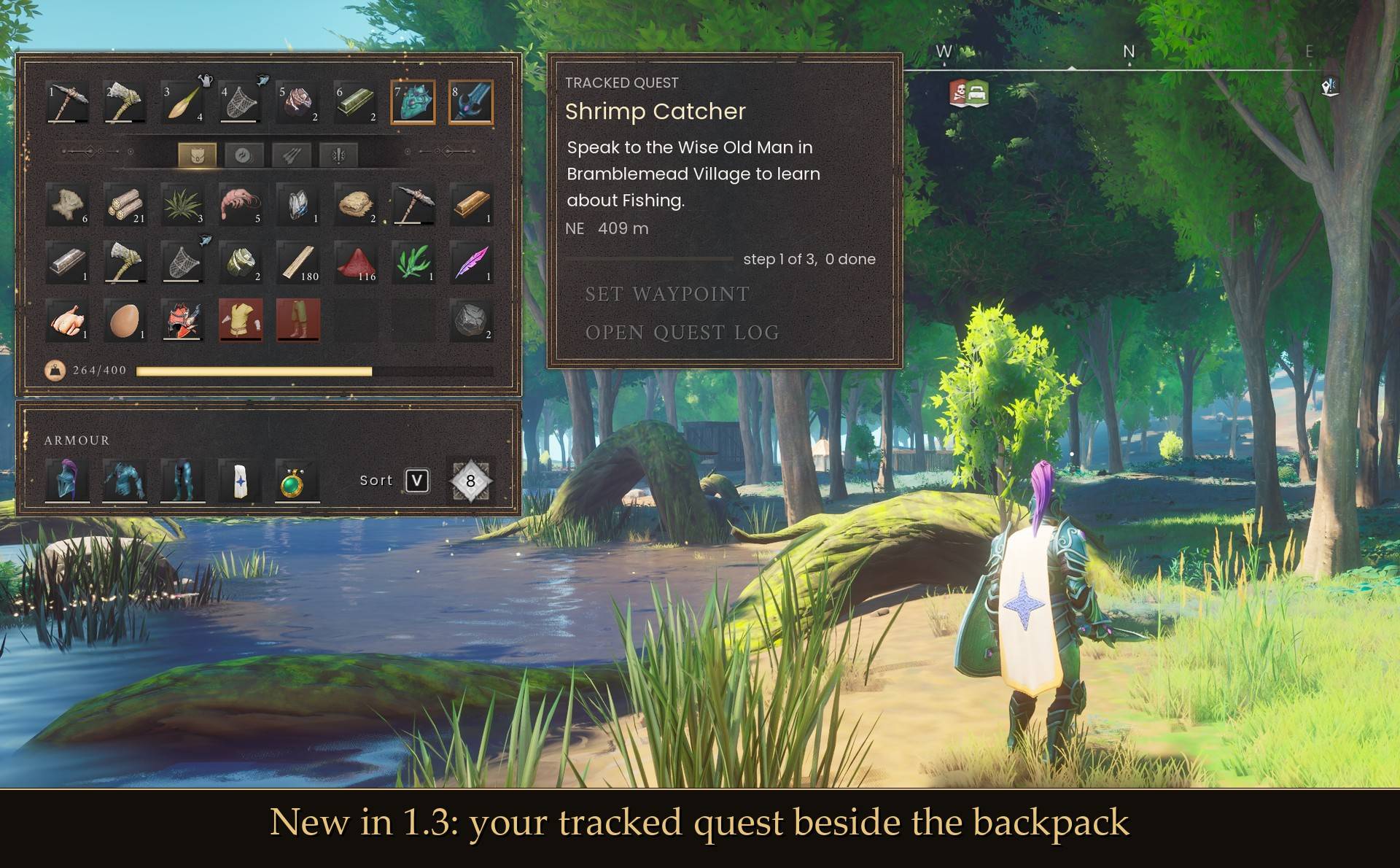
Open your inventory and a card sits next to the backpack. It shows:
- The quest, with TRACKED QUEST above it when it is the one you are tracking
- Its current objective, in the game's own words
- Which way and how far it is, like "NE 409 m"
- A progress bar with "step 1 of 3, 0 done". It hides when "Show quest steps" is off
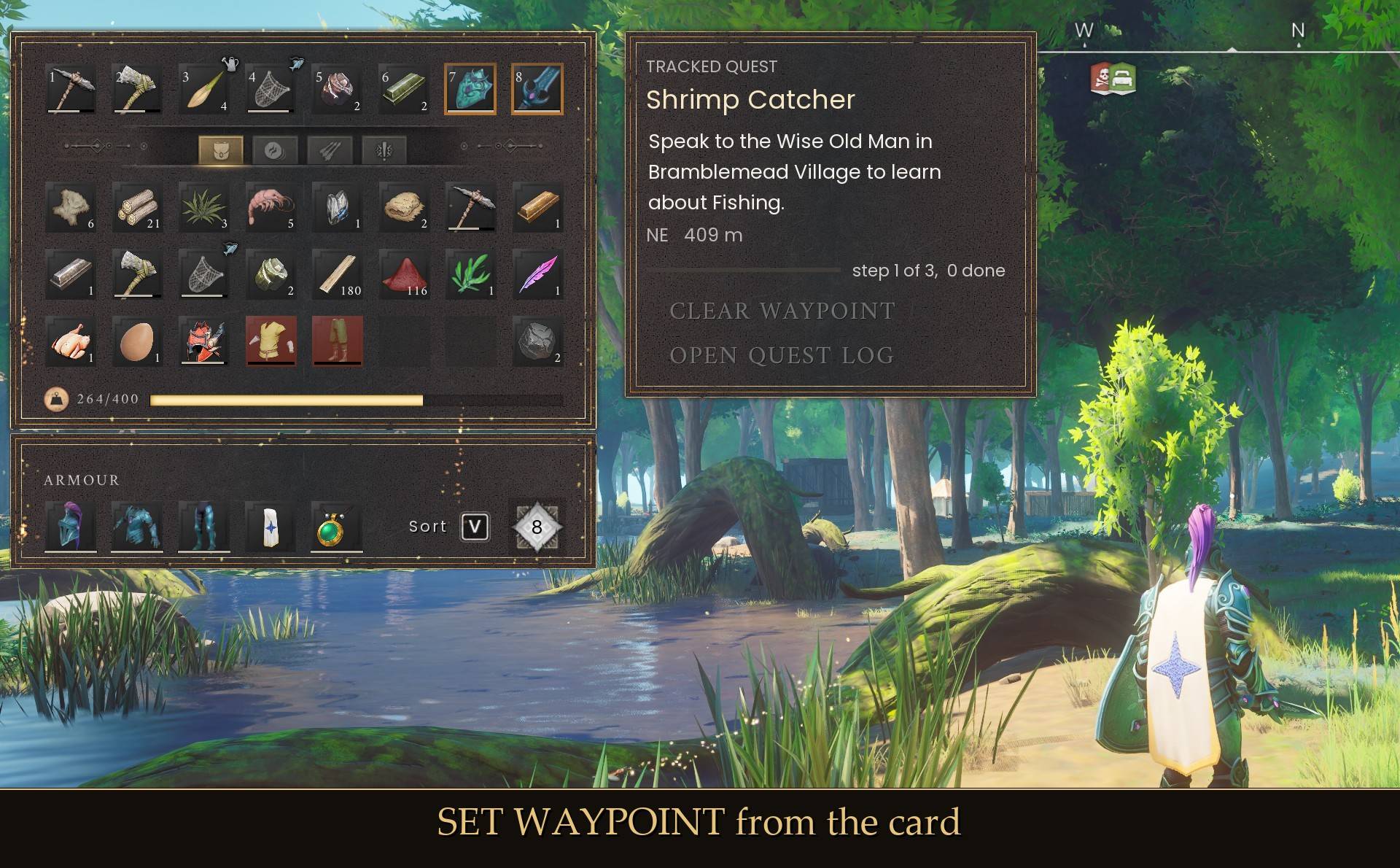
- SET WAYPOINT, which puts the game's own waypoint on that objective. The button then reads CLEAR WAYPOINT, and pressing it removes the waypoint
- OPEN QUEST LOG, which opens the log with that quest already selected
Which quest it shows: the one you are tracking. If you are not tracking one, the main story quest you are on. If there is none, your first quest in progress.
The card hides while the quest log is open, and when you open a crafting station (I checked the sawmill). Don't want it? Turn off "Quest card in inventory" in Mod Menu, or set ShowInventoryCard = false in config.txt.
The steps
Every quest in the game carries its own step list, the same sentences the HUD shows you one at a time: "Hunt a deer and bring one of its antlers to the Wise Old Man", "Siege the goblin castle and look for Cathan". The game never shows you the list. The log does, reads the sentences from the game so they are in your language, and marks where you are.
A few quests branch or let you do their steps in any order (Icthlarin's Little Helper and Regicide among them). For those the log marks the step you are on and lists the rest without ticks, rather than guess which ones you have done.
48 quests, and all 48 can be done
The game's files hold a second, unused version of the tutorial: six quests that no player is ever given. Earlier versions of this mod listed them, so a finished player sat at "48 of 54" forever. They are gone now. The tutorial chapters that share a name are shown as "First Steps, part 1" and "part 2".
What it changes
It never gives, completes or edits a quest, and never ticks a step. The only things it changes are ones you could change yourself on the map: the waypoint marker, and which side quest is tracked. Deleting the folder leaves no trace.
Install
- Install UE4SS for RSDragonwilds (it's in the requirements)
- Drop the QuestLog folder into
RSDragonwilds/Binaries/Win64/ue4ss/Mods/ - Load into a world, press Esc and pick QUEST LOG
On Game Pass: use the BE version of UE4SS with the SCO signature, the normal build does not load there (thanks JourneyOver for testing). Game Pass also installs the game under Binaries/WinGDK/ instead of Binaries/Win64/, so the QuestLog folder goes in RSDragonwilds/Binaries/WinGDK/ue4ss/Mods/. If you install with Vortex, check that is where it ended up.
To remove it, just delete the folder.
Config
Everything is in config.txt in the mod folder, and all of it except the card position is also in Mod Menu (Esc > MODS > Quest Log):
ShowInPauseMenu = true
MenuKey = none
ShowCompleted = true
ShowNotStarted = true
HideCompletedTheGameHides = false
DefaultTab = active
GroupBy = region
ShowSteps = true
ShowUpcomingSteps = false
ShowDistance = true
ShowActivity = true
Waypoints = true
TrackButton = true
ShowInventoryCard = true
CardX = 660
CardY = 57
MenuKey is optional if you would rather open it with a key than from the pause menu. J is the game's journal, so pick something free: I L N O T U Z are all unbound in Dragonwilds. Avoid F10 (the UE4SS console) and F11 (fullscreen). Since 1.3 the key does nothing while you are typing in chat (thanks palanolho for the report). The game keeps chat open after Enter sends a message, so press Esc to close chat before using the key.
GroupBy = status gives the plain list without region groups. CardX and CardY move the inventory card, in 1920x1080 screen units, and it scales with your resolution.
Notes
- The distance for a quest you have not started points at the person who starts it where the game marks one, otherwise at the quest's nearest spot.
- Doric's Quest shows a location instead of "how it begins": it is a collect-in-any-order quest with no single first step.
- You cannot move while the window is open, which is deliberate: clicks and keys go to the window, not to your character, so you will not swing a weapon or walk off a cliff through it.
- The fonts, the quest underline and the row markers are the game's own, read from your installed game. The mod ships no artwork of its own.
- The card's buttons borrow their look from the pause menu, so until you have pressed Esc once in a session they show as plain text.
- It only runs in worlds you host. I haven't tested it as a co-op guest.
- Haven't tried it with a controller either. If you do, let me know how it goes.
- Not sure it's running? UE4SS.log has a line starting with
loaded v1.3.0.
Tested on 1.0: every tab and grouping, the step lists, how-it-begins on quests from every region, waypoints and tracking, and dozens of tab switches and open/close cycles in a row to make sure it stays stable.
1.3.0 tested on the 1.0 hotfix (build CL-244954) with UE4SS 3.0.1 stable: the card on a tracked quest and on an untracked one, SET WAYPOINT, CLEAR WAYPOINT and OPEN QUEST LOG from the card, the card hiding at the sawmill and while the log is open, 20 inventory open/close cycles in a row, the card coming back after exiting to the main menu and loading the world again, at 1920x1080 and 3440x1440, and typing in chat with the key bound (the log stayed shut). Not tested yet: co-op, controller, Game Pass, and the "main story quest" part of the card's pick rule (my test character had no main quest going).
The Quest Log Team
