
Time Control
2-dawn-pair.jpg
0-thumb.jpg
1-dusk-pair.jpg
3-mod-menu.jpg
4-mod-menu-dawn-dusk.jpg
Description
Your days, your nights. Skip ahead, pause the clock, or make days last longer.
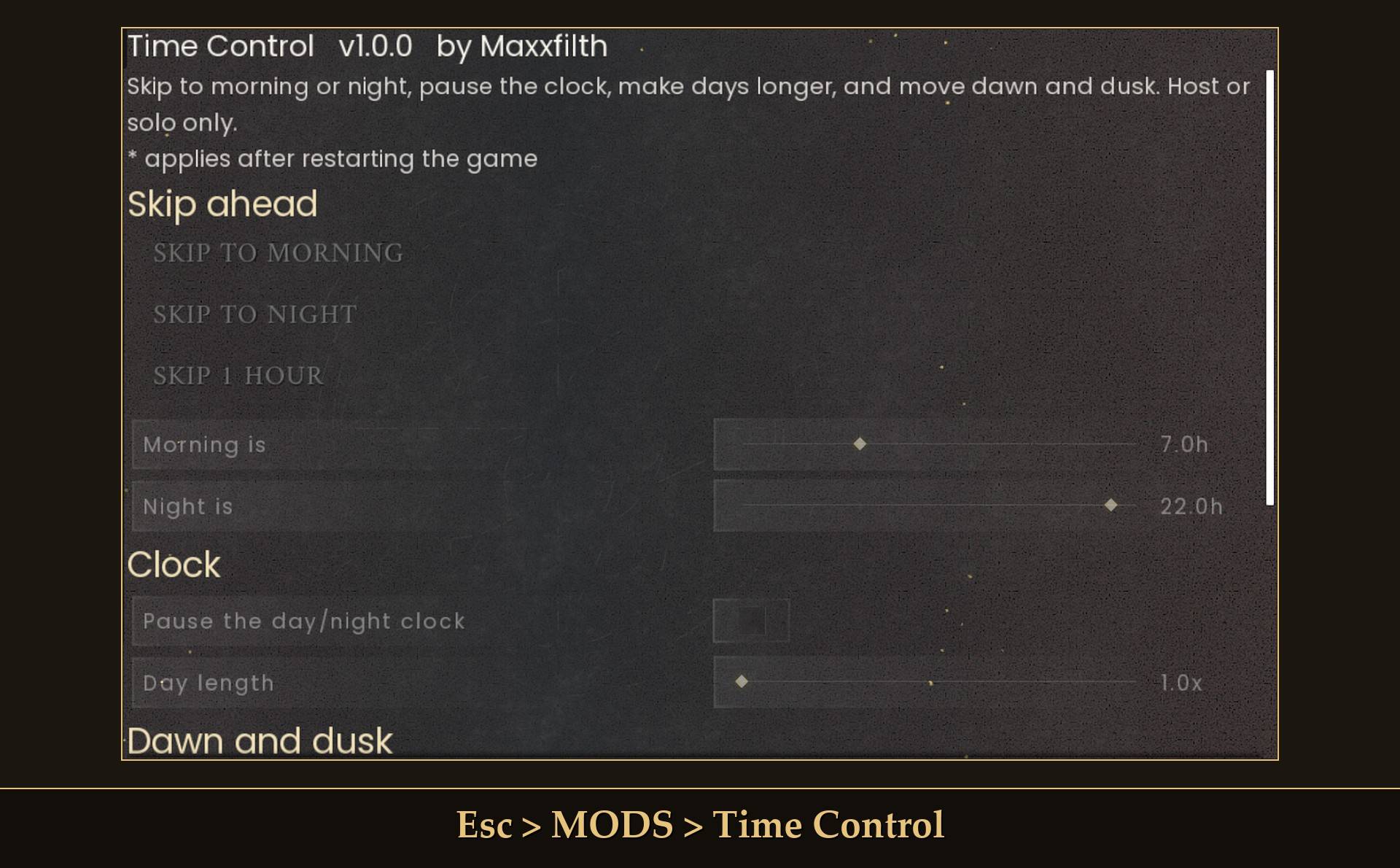
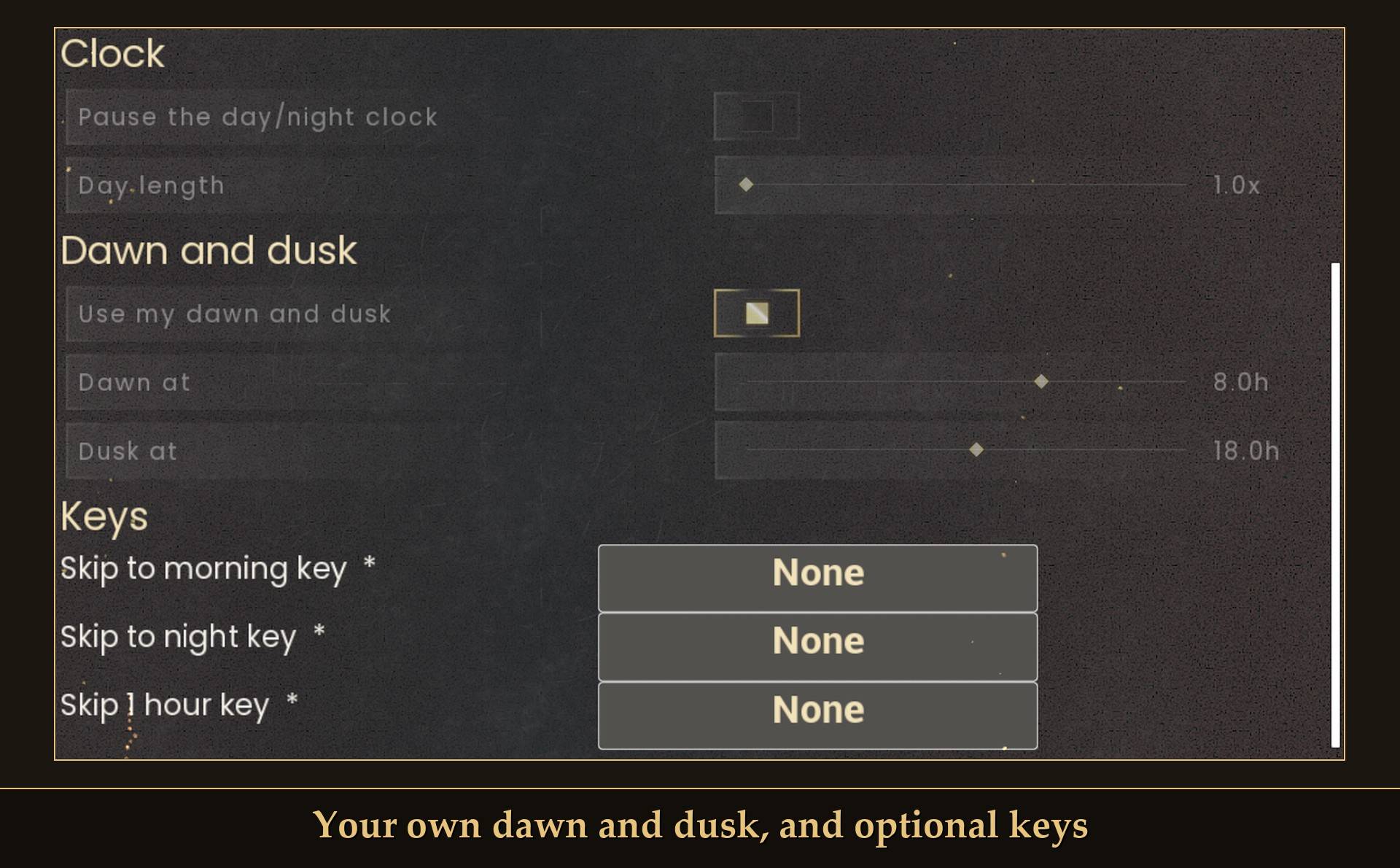
Buttons to skip to morning, skip to night or jump ahead an hour, a pause switch for the day/night clock, a day length slider, and your own dawn and dusk hours. All live from Mod Menu, all starting at the normal game.
A day in RuneScape: Dragonwilds is 24 real minutes, and the game's world settings have nothing for day length or the hours of daylight. The game already lets you sleep through the night in a bed or shelter. I wanted more than that: skip from wherever I am, skip to night as well as morning, and make days last longer. So these are buttons and sliders you change while you play, not a fixed setting baked into a file.
What it does
- Skip to morning: jumps to 7:00 (change it with the "Morning is" slider). If it is already past 7:00, you go to 7:00 the next day.
- Skip to night: jumps to 22:00 (change it with "Night is").
- Skip 1 hour: exactly one in-game hour ahead.
- Pause the day/night clock: the in-game clock stops where it is. The day counter and the weather stop changing with it. Skips still work while it is paused.
- Day length: 1x to 8x. At 4x the clock ran at about 15 in-game minutes per real minute instead of 60, so a day takes about an hour and a half instead of 24 minutes.
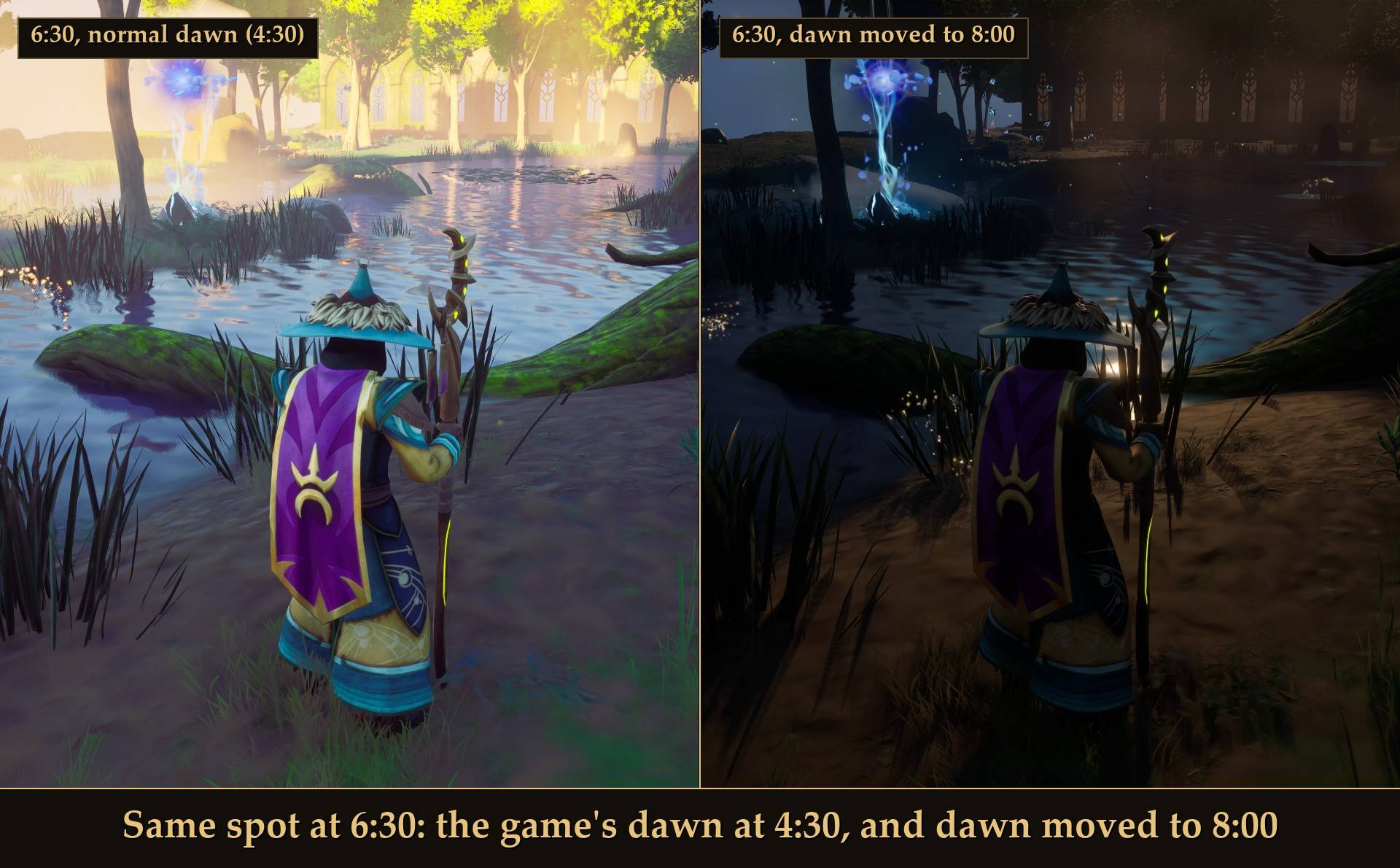
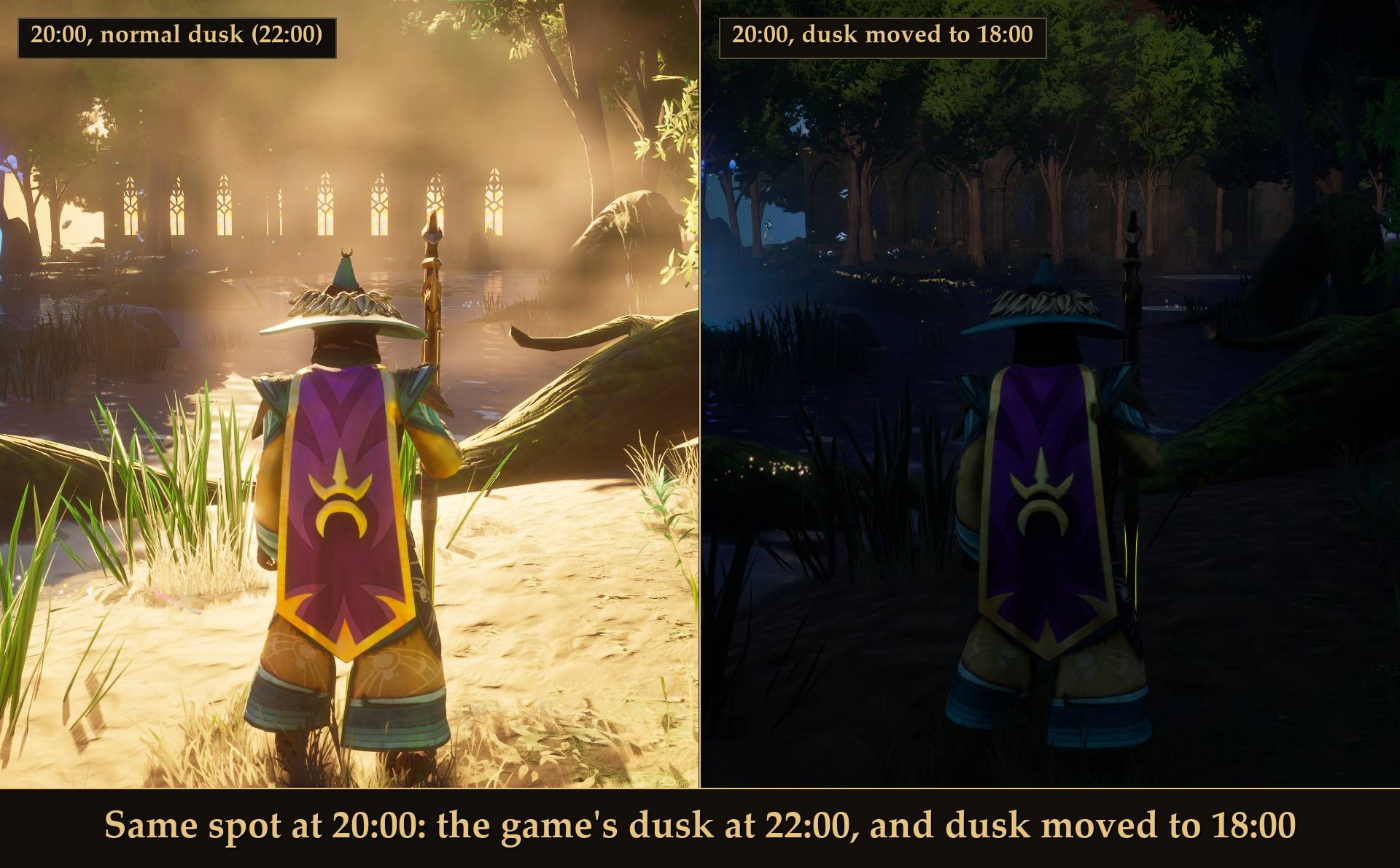
- Your own dawn and dusk: turn on "Use my dawn and dusk" and pick when daylight starts and ends. The sun moves at once.
Sleeping vs this mod
In the normal game, sleeping in a bed or a summoned shelter at night takes you to morning, fills your rest meter and clears effects like Bleed and Poison. During the day it is a nap. This mod adds to that:
- Skip to morning from anywhere, with no bed or shelter, and without waiting for night.
- Skip to night, or one hour at a time.
- Pause the clock, make days longer, and move dawn and dusk.
A skip only moves the clock. It is not sleep: it does not fill your rest meter or clear effects. Use a bed or shelter for that.
Dawn and dusk
The game's own hours are dawn at 4:30 and dusk at 22:00. Move them for longer daylight and shorter nights, or the other way round. The picture at the top is the same spot at the same clock time, 20:00, with only the dusk hour changed. Here is the morning side, 6:30 with the normal dawn and with dawn moved to 8:00:
Turn "Use my dawn and dusk" off and the game's own hours come straight back.
Hunger and thirst, plainly
- A skip costs food and water. The game charges you for every hour you skip, the same as if you had lived through it: about 5.5 points of water and 4 of food per skipped in-game hour. Skipping from 23:40 to 7:00 cost about 40 water and 30 food in testing. Eat and drink first.
- Pause and longer days do not slow hunger and thirst. They keep draining per real minute, like normal (with the clock paused, water still dropped about 6 points in a real minute). So with a 4x day you eat and drink about 4 times as much per in-game day.
Settings
All live in Mod Menu (Esc > MODS > Time Control), or in config.txt in the mod folder:
- Skip to morning / Skip to night / Skip 1 hour: buttons.
- Morning is: 7.0 h by default (0 to 23.5, in half hours).
- Night is: 22.0 h by default (0 to 23.5).
- Pause the day/night clock: off by default.
- Day length: 1.0x by default (1 to 8, in steps of 0.5).
- Use my dawn and dusk: off by default (off = the game's own 4:30 and 22:00).
- Dawn at: 4.5 h by default (0 to 12). Only used while "Use my dawn and dusk" is on.
- Dusk at: 22.0 h by default (12 to 23.5), always at least an hour after dawn.
- Skip to morning key / Skip to night key / Skip 1 hour key: none by default. Key changes need a game restart. Numpad keys picked in Mod Menu need Mod Menu 1.0.7 or newer.
Install
- Install UE4SS for RSDragonwilds (free, from the UE4SS for RSDragonwilds page on Nexus Mods).
- Drop the
TimeControlfolder intoRSDragonwilds/Binaries/Win64/ue4ss/Mods/ - For the buttons and sliders in game, also install Mod Menu and open Esc > MODS > Time Control. Without it, set keys in
config.txtto use the skips.
On Game Pass: use the BE version of UE4SS with the SCO signature, the normal build does not load there. Game Pass also installs the game under Binaries/WinGDK/ instead of Binaries/Win64/, so the TimeControl folder goes in RSDragonwilds/Binaries/WinGDK/ue4ss/Mods/. If you install with Vortex, check that is where it ended up.
To uninstall, delete the TimeControl folder. There is nothing to undo in your world: see below.
Dedicated servers
- Install it on the server. Time Control works on a dedicated server when it is installed on the server. The server needs UE4SS running on it. Tested on the Windows dedicated server.
- No menu on a server. Set the values in
config.txtin theTimeControlfolder on the server. Changes are picked up in about 10 seconds, no restart. - One clock for everyone. Day length and pause then apply to everyone on the server. Tested: with day length at 4x a joined player's clock ran at one quarter speed.
- Known limit: dawn and dusk. Custom dawn and dusk hours set on a server change the server's own day and night, but players' skies still follow the normal hours for now.
- Skips: the skip keys and the Mod Menu buttons (skip to morning, skip to night, skip an hour) are for solo and hosted play. A server has no keys or menu.
- Solo and hosting from inside the game work as before. A copy on a player's own PC does nothing on a server.
Good to know
- Your world's date is never rewritten. Longer days work by stopping the clock for part of every second, not by changing the game's own day length value (changing that value rescales the saved date, which is why I did not use it). After a save and reload the date and time were exactly where they should be. Pause and your dawn and dusk hours are not saved either: take the mod out and the world runs normally.
- Joining someone else's world: your copy does nothing; the host's clock decides. Player-hosted co-op has not been tested, so I don't know yet what guests see when the host skips or pauses. On a dedicated server the mod goes on the server, see Dedicated servers above.
- Pause beats day length. With both on, the clock stays paused. If the game ever pauses the clock itself, day length waits until it runs again.
- Skips only go forward. Nothing here can move the clock backwards.
- Works with Weather Control. Weather runs on the in-game clock, so with the clock paused the weather stays as it is, and a skip makes the game pick new weather straight away.
- No messages on screen. Skips and settings are logged in UE4SS.log.
- Not sure it is running? UE4SS.log shows a line starting with
[TimeControl] loaded v1.0.0.
Tested on RuneScape: Dragonwilds 1.0 (the 22 and 25 September builds) in solo: all three skips by key and by Mod Menu button, the pause holding the clock still for over a minute, day length at 4x, dawn and dusk moving the sun, the date intact after a save and reload, and 15 minutes alongside my other mods with no errors. Not tested yet: player-hosted co-op, controller, Game Pass.
The Time Control Team
