Ward Shield
Screenshot 2026-09-29 163729.png
Screenshot 2026-09-29 163738.png
Screenshot 2026-09-29 163746.png
Description
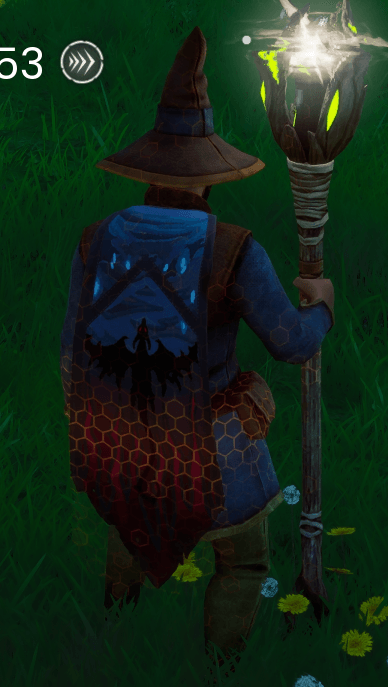
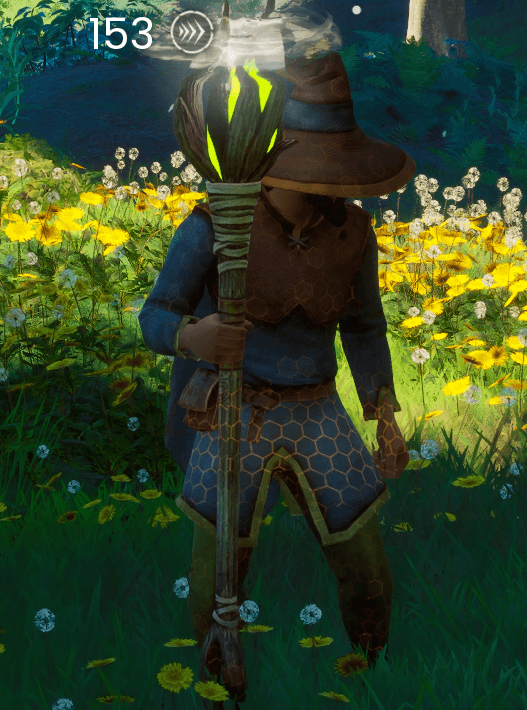
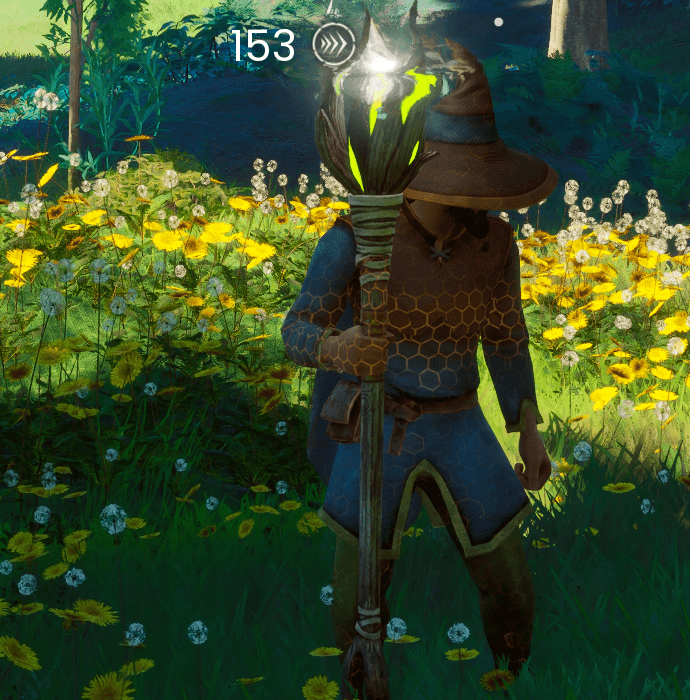
Reactive Shield gives you a regenerating energy shield that wraps your character in a glowing hex shell. It takes the hits before your health does. Stop taking damage for a moment and it rebuilds itself. Push it too far and it shatters, leaving you to dodge and survive until it comes back.
The shield is powered by Wards: six ancient artifacts hidden across Gielinor's wilds. Five of them are handed to you through a new quest line that follows the game's own journey from Brynmoor to the Scorned Wilderness. The sixth has never been found.
Features
- Regenerating shield. It absorbs incoming damage before your health, recharges after a short break from combat, and shatters with a burst when it's depleted.
- It stops status effects too. Poison, burning, bleeding, withering, frost, lightning and scorch build up on the shield first instead of on you.
- Six Wards, each with its own look and stats. Every Ward has its own shield strength, hardness, recharge speed and elemental affinity, and its own hex-shell colour and pattern on your character.
- A real Ward slot. A new slot in your inventory's Armour row. Wards are real items: drag them between your bag and the Ward slot like any gear. Hover the slot for a full tooltip in the game's own style.
- Durability and repairs. Wards wear down as they absorb damage. When one breaks, the shield drops until you take it out and repair it at a crafting bench.
- Your armour is protected. While the shield absorbs a hit, your equipped armour doesn't lose durability.
- A full quest line. Wards come from NPCs you already know, asked through the game's own conversation menu. Each has written dialogue and points you onward to the next.
- Proper quest tracking. Active Ward quests appear as gold main-quest cards in your map's quest list, with a search area circled on the map. You still have to find the chest yourself.
- Real loot chests. Each Ward waits in a chest with normal loot. Open it, take what you want, and the quest moves on.
- A secret sixth Ward. There's no quest for it. There's only a rumour, if you find the right person late in the game, and some very dangerous ground.
- Single player, co-op and dedicated servers. The server decides everything (damage, chests, progress), so it plays fair in multiplayer.
- Safe for your saves. See below.
The Wards
| Ward | Shield | Hardness | Recharges after | Recharge speed | Durability | Strong against |
|---|---|---|---|---|---|---|
| Ember Ward | 100 | 10% | 4.0 s | 15/s | 1,000 | Burning, Scorch |
| Tide Ward | 175 | 25% | 3.5 s | 25/s | 1,500 | Poison, Chilled |
| Stone Ward | 275 | 40% | 3.0 s | 35/s | 2,000 | Bleeding, Slow (blocks breaking hits) |
| Storm Ward | 375 | 55% | 2.5 s | 50/s | 2,500 | Shocked, Chilled (blocks breaking hits) |
| Dragonkin Ward | 750 | 70% | 2.0 s | 70/s | 3,000 | Wither, Scorch, Burning (blocks breaking hits) |
| ??? | ??? | ??? | ??? | ??? | ??? | ??? |
Hardness is how much of each hit the Ward shrugs off. At 40%, a 50-damage hit only drains 30 shield. "Strong against" elements drain the shield at half the rate.
How to start
Talk to the Wise Old Man and choose "Ask about the Wards." in his conversation. He'll take it from there.
The later Wards open up as you reach new regions in the main story. If a character has something to say about Wards, the option appears in their conversation.
Safe for your saves
- Nothing is ever written into the game's save format that the game doesn't already understand. Remove the mod at any time and your character and worlds load exactly as before.
- Your Ward quest progress is kept in the mod's own folder (
ue4ss\Mods\ReactiveShield\). - If you remove the mod while carrying Wards, they simply become plain rings. No corruption, no errors.
Works with other mods
- The asset pak only adds its own files and doesn't replace anything from the game, so it can't conflict with other pak mods.
- It doesn't take over the game's visual effects, UI or death rules. It works alongside god-mode, creative and UI mods.
- Settings are in
ue4ss\Mods\ReactiveShield\config.txt: the shell's see-through level, and the key that closes the Ward conversation, if it clashes with another mod.
Installation
Single player and co-op (host or join)
- Click Install in the CurseForge app. It installs Reactive Shield, its Reactive Shield – Assets files and UE4SS for you.
- Start the game, talk to the Wise Old Man, and ask about the Wards.
Everyone playing together needs the mod installed. If you join a server that doesn't have it, the mod tells you and stays out of the way.
XBOX GAME PASS USERS Download Xbox version Here: https://drive.google.com/file/d/1avaQY8OS8xkCAir88VmUh6l6mWOVNMMb/view?usp=sharing
How to install
Close the game. Find your game folder: in the Xbox app, open RuneScape: Dragonwilds and click "…" → Manage → Files → Browse. A folder opens containing a folder called RSDragonwilds. Unzip the download and copy the RSDragonwilds folder from it into that game folder. Choose Replace if asked. One rename: go into RSDragonwilds\Binaries\WinGDK\ue4ss\ and rename UE4SS-settings.ini.txt to UE4SS-settings.ini. If you can't see the .txt, click View → Show → File name extensions in File Explorer first. Start the game, talk to the Wise Old Man and choose "Ask about the Wards."
DEDICATED SERVERS
CurseForge doesn't allow the server loader file, so the server version is downloaded here: https://drive.google.com/file/d/1QYb3lPd0u3k0Yb7xNg8CMYVHQpz2RyAt/view?usp=sharing. Follow the INSTALL.txt inside. Players install Ward Shield from CurseForge as usual.
Manual install (without the CurseForge app)
- Install UE4SS for Dragonwilds, so you have
RSDragonwilds\Binaries\Win64\dwmapi.dlland aue4ssfolder. - Extract ReactiveShield-v1.0-UE4SS.zip into
RSDragonwilds\Binaries\Win64\ue4ss\Mods\. - Extract ReactiveShield-Assets-v1.0.zip into
RSDragonwilds\Content\Paks\~mods\. Create the~modsfolder if you don't have one.
Windows Defender flagged UE4SS.dll?
Some Defender updates flag UE4SS.dll as Trojan:Win32/Bearfoos.A!ml. The "!ml" means a machine-learning guess, and this is a known false positive for UE4SS, which every UE4SS mod uses. Restore it from Windows Security → Protection history ("Allow on device"), and add an exclusion for the ue4ss folder. It has been reported to Microsoft.
Uninstall
Remove it in the CurseForge app, or delete ue4ss\Mods\ReactiveShield\ and Content\Paks\~mods\ReactiveShield_P.*. Your saves are unaffected.
Accessibility
The shield never strobes or flashes rapidly. It shimmers softly and gives a single short flash when it takes a hit.
Credits
Made for the RuneScape: Dragonwilds × CurseForge modding contest. Built with UE4SS. Built By BondAlot
The Ward Shield Team