
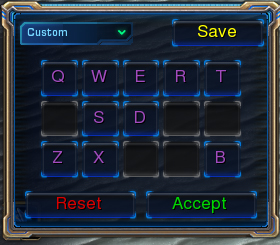
You input hotkeys here.
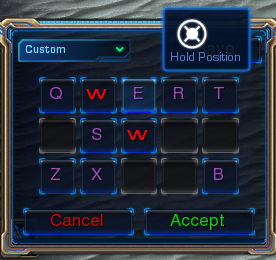
Dialog won't let you save duplicate keybinds. Also, icons and names in tooltips.
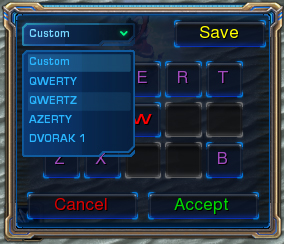
Use dropdown list to pre-set all binds into grid.
Description
Use pre-defined dialog box to edit hotkeys, you can either specify a set of them, or input Unit ID to automatically generate it.
Functions included:
- Hotkey thru UNIT
- Hotkey Setup thru Buttons
- Load Set
- Save Hotkeys to Bank
- Hide/Show Hotkey Box
- Change Hotkey Box Size and Position
Hotkey thru UNIT - Use this to open the editing box with command buttons taken from units command card.
Parameters:
- Player - player which window will open to.
- Unit Type - ID of unit to look up buttons.
- Set Number - Number of Set the buttons will be saved to. Use zero if you want to disable saving.
- Load Previous - Boolean, use TRUE if you want to load hotkeys previously saved at the same set number.
- Card Number - Number of Command card that should be copied. Input them as they appear in data editor (1,2,3,4 are accepted, else returns 1)
Hotkey Setup thruButtons - Use this to open the editing box with input Buttons.
Parameters: most of them same as thru UNIT, with addition of 15 button IDs to manually input. They're ordered as on command card.
Load Set - Loads previously saved Set of hotkeys, to buttons they were assigned to when saved. Note, it may interfere if player has edit box currently open.
Parameters:
- Set number - number of set to be loaded.
- Player - affected player.
Save Hotkeys to Bank - Forces currently selected hotkeys to be saved for input player. Function won't fire if Set == 0.
Hide/Show Hotkey Box - because I've set library to be Internal, use this to show/hide Editing Dialog. (Box automatically shows up when using setup functions thru unit or buttons)
Change Hotkey Box Size and Position - coz i slack i forgot to rename, it only changes position. Input X,Y and anchor.
Important note: Using this library requires certain Game Text to be input in your map, or else it won't be able to function. Either manually input, or copy/paste those values to localehere/LocalizedData/Hotkeys.txt inside your map .MPQ. Attached Hotkeys.txt file contains those values.
-
Known Problems: When creating new Hotkey Editing Box, it's impossible to read their current hotkey. Unless you load previously saved set, Dialog will show question marks instead. Thank blizzard for prohibiting text->string conversion.
The Customizable Hotkeys Team
