Live Minimap
1
2
Description
# Live Minimap
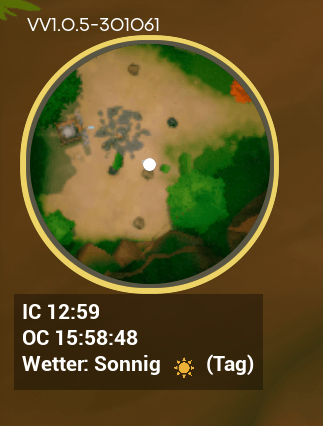
A lightweight, fully custom minimap for **Solarpunk**, built from scratch as a standalone UE4SS Lua mod. Round, always north-up, and designed from the start to avoid stutter.
## Features
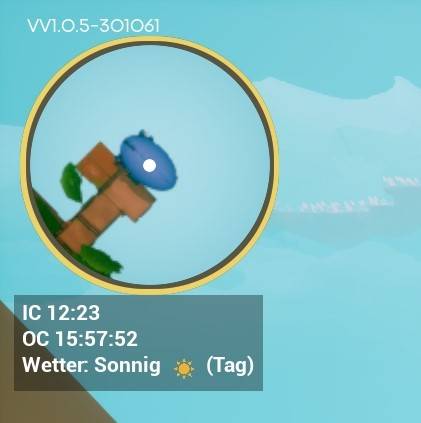
- **Round live-camera minimap** — a real top-down snapshot of the terrain around you, not just abstract dots on a blank background.
- **F4 to toggle** — press once to build it, press again to show/hide instantly.
- **Always north-up** — the map itself never rotates, so it stays easy to read at a glance.
- **Live player marker** — a small dot always centered on your position.
- **Seamless background refresh** — the map quietly refreshes itself every 30 seconds (configurable) so it never goes stale, even after long-distance travel (e.g. by airship) — no visible flicker or interruption.
- **Correct in multiplayer** — always shows *your own* position, never the host's, when playing as a guest in a hosted session.
- **Performance-first** — a single on-demand snapshot instead of continuous rendering, plus careful tick-rate throttling throughout. Built and iterated specifically to avoid frame drops.
- **Small footprint, no dependencies beyond UE4SS** — pure Lua, no external assets, no changes to game files.
## Known limitation
During in-game thunderstorms, the captured photo can show a uniform, washed-out color instead of readable terrain. This appears to be a global weather/post-process effect applied at a level the mod's capture camera can't override, and is a permanent, accepted limitation — everything else (clear weather, night, indoors) works normally.
## Installation
1. Install [UE4SS](https://github.com/UE4SS-RE/RE-UE4SS) for Solarpunk if you haven't already.
2. Extract this mod into `Solarpunk/Binaries/Win64/ue4ss/Mods/SolarpunkMinimap/`.
3. Make sure `enabled.txt` is present in that folder (it should be included).
4. Launch the game and press **F4** in-game to show the minimap.
## Console commands (optional tuning)
Open the UE4SS console and type `minimap` for a full command list. Useful ones:
- `minimap window <pixels>` — resize the minimap window.
- `minimap ortho <width>` — zoom level (how much world area is visible).
- `minimap captureinterval <ms>` — how often the map auto-refreshes (`0` disables it).
- `minimap offset <x> <y>` — reposition the minimap on screen.
- `minimap refresh` — force an immediate refresh.
All settings persist automatically to `config.ini` in the mod folder.
## Compatibility
Pure UE4SS Lua, no game files modified. Should be compatible with other UE4SS mods; only interacts with the base game's own HUD overlay widget to attach its window.
## Credits
Built entirely from scratch — no assets, code, or logic reused from any other minimap mod.
---
## Deutsch
Eine schlanke, komplett eigenständige Minimap für **Solarpunk** — rund, immer Norden-oben, mit F4 ein-/ausblendbar. Zeigt ein echtes Live-Kamerabild der Umgebung (kein statisches Bild), aktualisiert sich alle 30 Sekunden unauffällig im Hintergrund und zeigt im Mehrspieler-Modus immer die eigene Position an. Von Grund auf auf Performance ausgelegt (Einzel-Schnappschuss statt Dauer-Rendering). Einzige bekannte Einschränkung: bei Gewitter zeigt die Karte eine einheitliche Farbe statt Gelände — ein dauerhaft akzeptiertes, technisches Limit.
**Installation**: UE4SS installieren, Mod-Ordner nach `Solarpunk/Binaries/Win64/ue4ss/Mods/SolarpunkMinimap/` entpacken, im Spiel **F4** drücken.
The Live Minimap Team