



Description
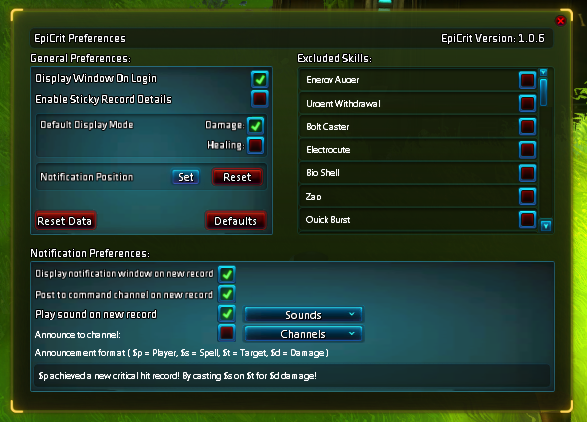
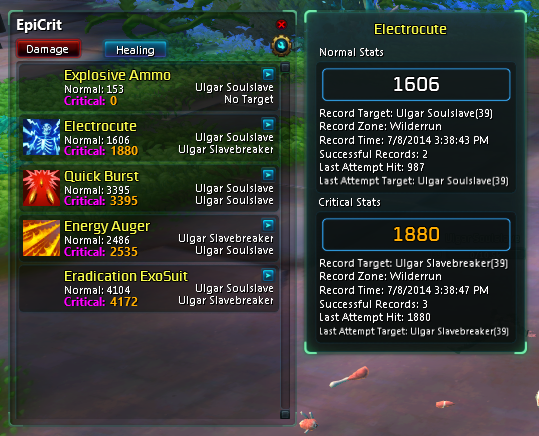
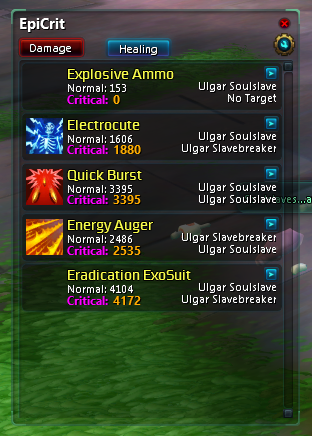
EpiCrit is a logging mechanism for the purpose of tracking your maximum critical as well as maximum normal(non-critical) hits on enemies.
Features
-
Track maximum critical hit for each skill
-
Track maximum normal (non-critical) hit for each skill
-
Tracks both damage and healing
-
Exclude unwanted skills from being tracked
-
Extended record details (Record Target (Record Target Level), Record Zone, Record Time, Successful Record Count, Last Hit Attempt Damage, Last Hit Attempt Target)
-
Set default display mode (damage or healing)
-
Post to command channel on new record (for only you to see)
-
Play sound on new record
-
Announce to channel(s) on new record
-
Set announcement format (see updated usage for details)
- Set announcement notification window placement and scale
Known Issues
- No skill icon's for Proc's, specials, and non-skilled healing
Usage
-
/ec slash command will restore the window if you have closed it
Announcement format:
To change the message display in a chat channel is simple. In the preferences panel you will see a text box allowing you to edit the string.
$p = Player Name, $s = Spell Name, $t = Target Name, $d = Damage amount.
For example: "Holy cow $p just dropped a new critical hit on $t with $s for $d damage!!! Ouchhhh!"
Example Ouput: "Holy cow ZiggyStardust just dropped a new critical hit on Ulgar Soulslave with Electrocute for 1880 damage!!! Ouchhhh!"
Changes
Version 1.0.9
New Features
- Ability to remove a single record from the saved data in extended record details menu
- Ability to untrack skill in extended record details menu
- Ability to track self damage
- Ability to track self healing
- Added Tooltips to skill records
Version 1.0.8
Bug Fixes
- Fixes issue posting to Guild channel
Version 1.0.7
New Features
- Ability to set the notification popup window location and scale
- Ability to reset preferences to defaults
Performance Enhancements
- Using GeminiProfiler I was able to significantly optimize the two heavy functions. This has resulted in an 80-87% increase in performance over the last version on my test environment.
Version 1.0.6
New Features:
- Set default display mode (damage or healing)
- Post to command channel on new record (for only you to see)
- Play sound on new record
- Announce to channel(s) on new record
- Set announcement format (see updated usage for details)
Bug Fixes:
- Changed method of data capture that should increase performance across the board, there should not be any lag.
Suggestions:
If this is your first time using the addon (or any time you clear data) I suggest you disable any type of announcements to the outside world. New records can rack up fairly quickly and can spam public chat channels.
Version 1.0.5
- Fixed a few issues that cause stutter in frame rate during play
- Details panel now updates when open if sticky details is enabled
Version 1.0.4
- Fixes bug where healing data was not being saved correctly.
Version 1.0.3
- Added preference option to show window on login. The default is false.
- Added preference option to make record details sicky. This will keep the details up even when in combat.
- Made main window resizeable
Version 1.0.2
- Fixes bug in PvP where target may be nil when accessed
Version 1.0.1
- Fixed a bug where the caster unit could be nil during PvP
- Fixed issue where details window would flash during PvP
Version 1.0.0
- Initial Release
The EpiCrit Team
