Outfitter (Transmog)
Description
Description
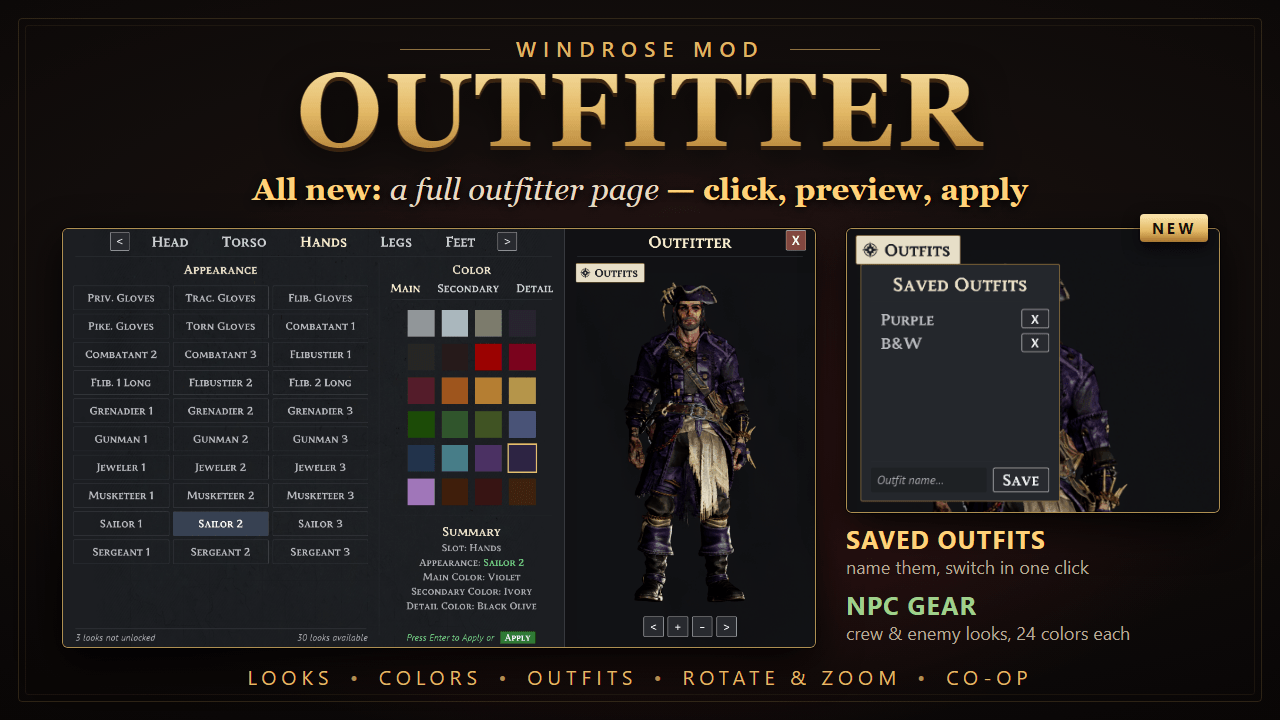
Found a helmet with great stats that looks terrible? Outfitter lets you keep any armor equipped for its stats and set bonuses, while your character shows the look of a different piece you've already learned, or the gear of the crews and enemies you meet. Recolor every piece, save complete outfits, and switch between them whenever you like.
Open your inventory and press F8. The Outfitter page opens over your inventory. Pick a slot, click a look and up to three colors, and watch your character change in the live preview. Click Apply or press Enter, and your character wears it. Whatever helmet you equip after that keeps the look and colors you chose for the head slot.
Main features
- The Outfitter page: a full page in the game's own style, used with the mouse. Slot tabs at the top (Head, Torso, Hands, Legs, Feet), all your looks as tiles, a color grid, a summary, and a large preview of your character.
- One look per slot: from all 8 armor sets.
- NPC gear: wear what the NPCs wear: Blackbeard's Grenadiers, Musketeers, Sailors, Sergeants and Huntsmen, Combatants, Dogfaces, Flibustiers, Jewelers, Gunmen, the Shaman and more. Only pieces made for your character's body are offered.
- Colors: give each slot its own Main, Secondary and Detail color from the game's own palette of 24 cloth colors. The grid shows the actual colors, and the one in use is outlined in gold.
- Saved outfits: save the whole outfit (looks and colors of all five slots) under a name, load any saved outfit with one click, and delete the ones you don't need.
- Live 3D preview:
- Drag the character to rotate it, or drag up and down to move the view.
- Use the mouse wheel or the < + - > buttons to zoom.
- The preview is rendered sharper while the page is open.
- Nothing changes until you apply: unapplied changes show in green in the summary, together with an Apply button. Closing the page throws away changes you didn't apply.
- Only looks you've earned: the page shows armor you've picked up or learned the plan for, so you can't wear a look you haven't found yet. The starter pieces are always available. A counter shows how many looks are available and how many you haven't unlocked.
- Instant: your character updates as soon as you apply.
- Remembered: your looks, colors and outfits are saved and come back every time you start the game, even on the main menu character.
- Tooltip tag: equipped pieces with a look show [Appearance: ...] in purple at the bottom of their description.
- Co-op: everyone with the mod sees everyone's looks. Changes show up for the other players right away, and players usually see each other's looks as soon as they load in.
- Safe: your items, stats and save are never changed. Remove the mod and everyone looks normal again.
Controls (inventory open)
- F8: open or close the Outfitter page. The bottom-right corner of the inventory shows an "F8 Outfitter" hint.
- Mouse:
- Click a slot tab, a look, a color part (Main, Secondary, Detail) and a color.
- Drag the preview to rotate it, and use the mouse wheel to zoom.
- The Outfits button opens your saved outfits.
- Apply or Enter: apply all your changes. The first tile in each slot is your worn piece's own look, which sets the slot back to normal.
- X or F8 or Esc: close the page. Changes you didn't apply are discarded.
Note: If you use R5 Mod Settings, you can change the F8 key and turn the hint and tooltip line off in its Mods tab.
Installation
- To update: extract the new zip over your Windrose folder and replace the files. Do the same on your co-op host server or dedicated server if you installed it there. Your saved looks and colors are kept. New in 3.0: the mod now also has files in R5\Content\Paks\~mods\Outfitter\, which the page needs.
- To install:
- Install UE4SS for Windrose (see Requirements).
- Extract Outfitter.zip into your Windrose folder, the one that contains the R5 folder. You should end up with:
- R5\Binaries\Win64\ue4ss\Mods\Outfitter\Scripts\main.lua
- R5\Content\Paks\~mods\Outfitter\Outfitter_Cooked_P.pak (plus .utoc and .ucas)
- Start the game. The included enabled.txt turns the mod on, so you don't need to edit mods.txt.
- Co-op host: when you host from your own game, Windrose runs your world on a background server. Install UE4SS and the Outfitter Lua folder there too, in Windrose\R5\Builds\WindowsServer\R5\Binaries\Win64\ue4ss\Mods\, or the other players won't see your looks. The server doesn't need the pak files.
- Dedicated server: install UE4SS and the Outfitter Lua folder in the server's R5\Binaries\Win64\ folder the same way.
- To uninstall: delete ue4ss\Mods\Outfitter and R5\Content\Paks\~mods\Outfitter (and the Lua folder on the server too, if you installed it there).
Requirements
- UE4SS: a build that runs on Windrose's Unreal Engine 5.6. The stock UE4SS 3.0.1 release doesn't work with Windrose, so use an experimental build.
Good to know
- Co-op: every player who wants to see the other players' looks needs the mod. The server (your hosted game's server or a dedicated server) needs it to pass the looks along. Players without it just see everyone's normal gear, and nothing breaks.
- Mixed versions: NPC gear and saved outfits are new in 3.0. Players and servers on older versions show NPC gear as the original armor, so everyone, including the server, should update.
- Joining a world: players usually see each other's looks as soon as they load in. If someone's gear loads before their looks arrive, you'll see their normal gear at first. The next time each player opens their inventory, Outfitter quickly re-equips the pieces that have a look, in about half a second. This needs one free bag slot; if your bag is full, a short note tells you.
- Inventory only: the Outfitter page only opens with the inventory open. F8 does nothing anywhere else.
- Armor only: weapons, jewelry and backpacks aren't covered.
- NPC gear and your body: most crew and enemy pieces only exist for male characters, so female characters see fewer NPC looks (the Flibustier, Jeweler and Shaman pieces fit both or female).
- NPCs: on your own screen, an NPC wearing the same armor piece as you may show your chosen look.
- R5 Mod Settings: if you use R5 Mod Settings, Outfitter appears in its Mods tab. There you can change the F8 key (after a game restart) and turn the key hint and the tooltip tag off.
- Dedicated servers: these use the same server code as hosting from your game, which has been tested, but a dedicated server itself hasn't been tested yet.
- Game updates: a Windrose update may break the mod until I update it. If the page stops opening or looks stop applying, check here for an update.
Credits
- RedFalcon: for the Windrose UE4SS Modding Notes, which helped a lot while building this mod, and for the proposal that became the colors feature.
- UE4SS (RE-UE4SS team): the scripting framework Outfitter runs on.
- Windrose Mod Settings by IceBoxStudio (nexusmods.com/windrose/mods/442): Outfitter can show its options on that mod's settings page.
- WindrosePlus by HumanGenome: its documentation on running UE4SS on Windrose servers and its hook-retry approach informed Outfitter's co-op support.
- repak and retoc by trumank, UAssetGUI by atenfyr: used to study the game's files (armor data, colors, NPC gear and UI) while making the mod.
- Unreal Engine 5.6 (Epic Games): the Outfitter page was built in the Unreal Editor.
What changed from your old version:
- The small window and arrow-key controls are replaced by the page and mouse controls.
- The full-body preview item became the interactive 3D preview.
- Added NPC gear, saved outfits and the Apply button.
- Installation now covers the new Paks\~mods\Outfitter folder, and the server only needs the Lua folder.
- New notes: mixed versions, joining usually showing looks right away, and the NPC gear body limit.
The Outfitter (Transmog) Team