


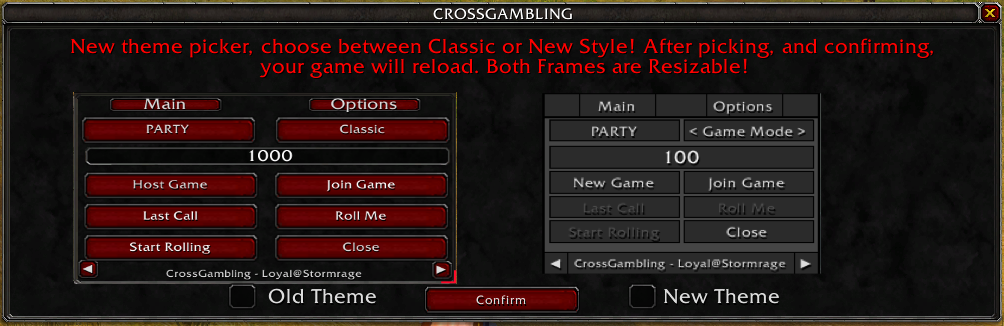

Dialog Box
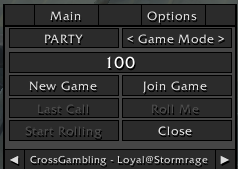
v3 Layout
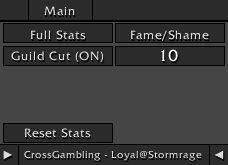
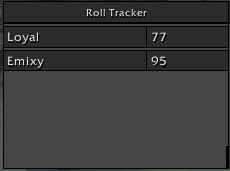
Description


CrossGambling
Six ways to win big or go broke — right in your chat.
Classic
Everyone rolls for the wager. Highest roll wins, taking the difference between their roll and the lowest roll.
1v1 DeathRoll
Just two players. Start at the wager and take turns rolling 1 up to whatever the last roll was. Whoever rolls a 1 loses and pays out the full wager.
Over/Under
Based on the real casino "Over/Under 7" bet. Everyone types "over" or "under" to call whether the host's roll (1-100) lands above or below 50. Call it right and the house pays you the wager, call it wrong and you pay the house. Land exactly on 50 and everyone loses to the house — just like the real casino version.
Elimination
Group DeathRoll. Everyone rolls each round and the lowest roll is knocked out, round after round, until only two players are left. Those final two settle it with real DeathRoll rules. Everyone who got knocked out along the way pays the eventual winner.
Hot Potato
Everyone keeps rolling, and each round whoever rolls lowest gets stuck holding the potato. After 5 rounds, whoever's left holding it pays everyone else.
Raffle
Join the game to buy a ticket at the wager price (the host can buy in too). Once entries close, the host rolls to draw a random winning ticket, and everyone else pays the winner.
Instructions
Setting Up a Game
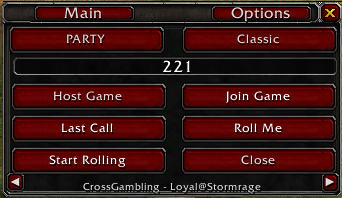
- Set your bet amount in the wager field.
- Press Host Game (only needed once per session).
- Pick your game mode with the Game Mode button — hover it any time to read that mode's rules.
- Press New Game to start a round.
- Players join by pressing Join or typing
1in chat. - To leave, press Leave Game or type
-1in chat. - Press Last Call! to check for last-minute joiners.
- When ready, press Start Rolling.
- Players roll with
/rollor by clicking Roll Me. - Results post automatically in chat.
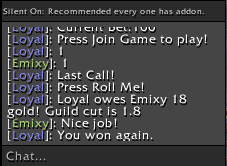
Change chat channels by clicking Party, or cycle modes with the Game Mode button (Shift+Click to post the current mode's rules to chat).
Silent Chat Mode
Enable Silent Chat Mode by clicking the Arrow on the top right. All players should enable it for the best experience.
Guild Cut Feature
Toggle Guild Cut (ON/OFF) to automatically deduct a percentage of winnings for your guild.
Roll Tracking Interface
Open the tracking menu using the Arrow on the top-left. Required for Silent Mode viewing, optional for normal play.
Commands
| Command | Function |
/CrossGambling | Displays the command list |
/CG | Displays the command list |
/CG show | Opens the UI |
/CG hide | Closes the UI |
/CG minimap | Shows/hides the minimap icon |
/CG allstats | Shows every player's all-time stats |
/CG stats | Shows the top 3 winners and losers |
/CG joinstats [main] [alt] | Links an alt's stats to a main |
/CG unjoinstats [alt] | Unlinks an alt from their main |
/CG listalts | Shows everyone who's been linked with joinstats |
/CG updatestat [player] [amount] | Manually adjusts a player's stats |
/CG deletestat [player] | Permanently deletes a player's stats |
/CG resetstats | Wipes all stats |
/CG exportstats | Opens the stats export window |
/CG importstats | Opens the stats import window |
/CG ban [player] | Bans a player from joining games |
/CG unban [player] | Unbans a player |
/CG listbans | Shows banned players |
/CG audit | Shows the history log |
The Cross Gambling Team
