
Heal Rank Advisor
- By
- Addons
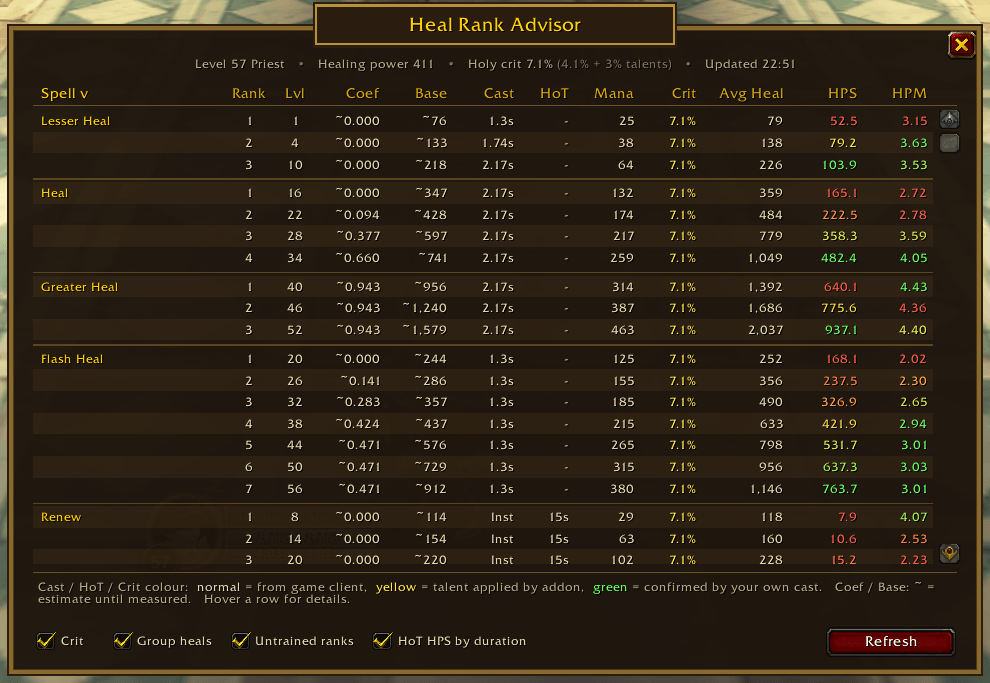
Note the ~ mark. This denotes guessed value.
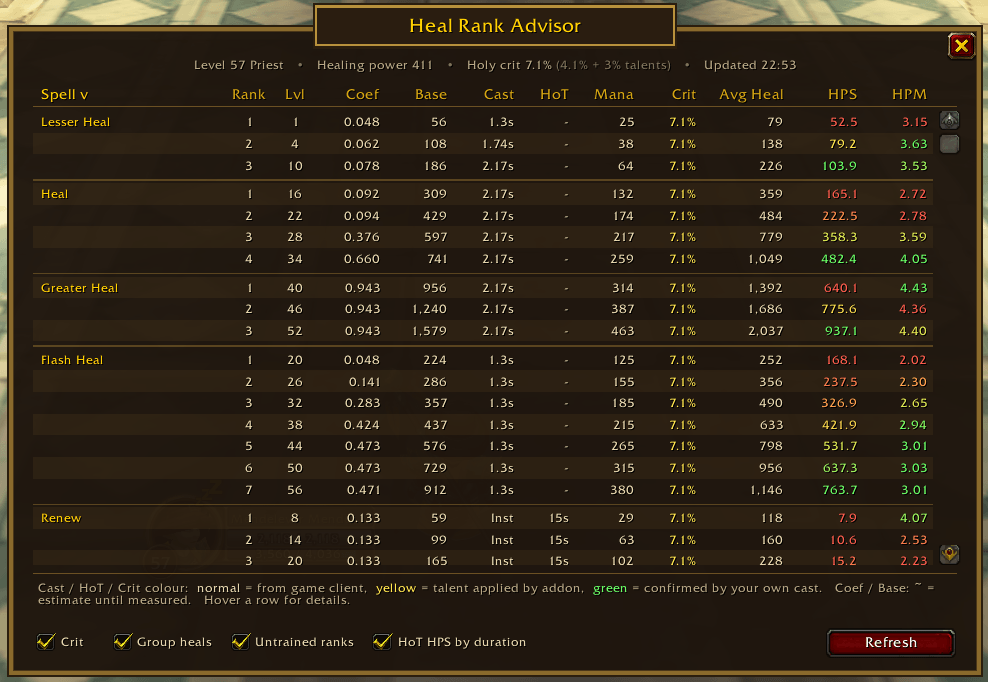
Learned values from changing gear with HRA open.
Description
Heal Rank Advisor
Which rank of my heal should I cast? Heal Rank Advisor answers that with one table. It lists every rank of every healing spell your character can use, shows how much each one heals per second and per point of mana, and works out each rank's healing power coefficient and base heal, using your gear, talents and level.
Made for WoW Forever.
Getting started
- Copy the
HealRankAdvisorfolder into your WoW ForeverInterface/AddOnsfolder (the same place as your other addons). - Start the game, or type
/reloadif you're already in. - Click the Lightwell icon on your minimap, pick Heal Rank Advisor from the addon list button next to the minimap, or type
/hra.
That's it. The table works straight away.
Reading the table
Each spell gets its own block, with one row per rank.
| Column | What it means |
|---|---|
| Spell / Rank | The spell and its rank. Grey rows are ranks your level allows but that you haven't trained yet. |
| Lvl | The level the rank is learned at. |
| Coef | The rank's healing power coefficient: how much extra it heals for each point of healing power. For example, 0.857 means 100 healing power adds about 86 healing. |
| Base | The rank's base heal: what one cast heals with 0 healing power. |
| Cast | Cast time. Inst = instant, ch = channelled. |
| HoT | How long a heal over time lasts. |
| Mana | Mana cost. |
| Crit | Your chance to crit with this spell, talents included. |
| Avg Heal | The average amount one cast heals with your gear, crits included. |
| HPS | Healing per second: how fast the rank heals. |
| HPM | Healing per mana: how efficient the rank is. |
HPS and HPM are colour-coded within each spell, from red (that spell's lowest) through yellow to green (that spell's highest), across the ranks you know. This tells you at a glance which rank of this spell is fastest or most efficient. As a rule of thumb, a fast, high-HPS rank is for emergencies and a high-HPM rank is for long fights where mana matters.
Coef and Base marked with ~ are estimates. They become exact once the addon has measured them (see below).
Hover over any row for the full breakdown: the spell's own tooltip, how much of the heal comes from your healing power, which talents affect it, crit details and more. Hover a column header for a short explanation of that column.
Click a column header (Spell, Coef, Base, Mana, Avg Heal, HPS, HPM) to sort by it.
Colours in the Cast, HoT and Crit columns
- Normal – straight from the game.
- Yellow – a talent changed this value (for example Holy Specialization adding crit).
- Green – confirmed by your own cast (see Confirming HoT durations below).
The options
The tick boxes along the bottom change how the numbers are worked out:
- Crit – counts the average value of critical heals. In WoW Forever heals over time can crit too, so every HoT tick counts.
- Group heals – multiplies heals like Prayer of Healing and Chain Heal by the number of people they hit.
- Untrained ranks – also shows ranks you could train at your level (in grey). Handy for deciding whether a trip to the trainer is worth it.
- HoT HPS by duration – for heals over time, shows healing per second on the target instead of healing per second of your casting time.
Your options and the minimap button position are shared by all your characters.
Keeping the table up to date
To save performance, Heal Rank Advisor does nothing in the background. It only recalculates when you:
- click Refresh (or right-click the minimap icon),
- change one of the options, or
- open it for the first time in a session.
The top line shows when the numbers were last calculated, for example "Updated 19:55". Click Refresh after you level up, train new ranks, change talents or change gear.
Getting the most accurate numbers
Measuring coefficients and base heals
Avg Heal, HPS and HPM are always exact, because they come straight from the game's tooltips. Coef and Base start as estimates (marked ~). The addon measures them exactly by comparing your spell tooltips at two different amounts of healing power:
- Click Refresh.
- Take off an item with healing power, wait a second, and click Refresh again.
- Put the item back on and click Refresh once more.
Once your healing power has changed by 20 or more, the ~ disappears for every rank. Each character keeps its own measurements. They start over automatically when you level up or change talents, because both change the numbers.
Confirming HoT durations
Some talents make heals over time last longer. To confirm a HoT's real duration:
- Open the table.
- Out of combat, cast the HoT (for example Renew) on yourself.
- A chat message tells you how long it lasts. Click Refresh and its HoT value turns green.
Do this once per rank. Respeccing clears the confirmation, since your talents may have changed.
Good to know
Downranking. In WoW Forever, once you are more than 17 levels above the level a rank is learned at, that rank's coefficient shrinks by 5% of its full value for every level, until it gets nothing from your healing power. That's why an old rank's Coef can be much lower than a newer rank's. Hovering a row tells you when that rank starts and stops fading.
Power Word: Shield is listed with your heals so you can compare it, even though it absorbs damage instead of healing. It never crits, and remember it only counts if the target actually takes that much damage. Weakened Soul stops you shielding the same person again for 15 seconds.
Penance fires 3 bolts over a 2-second channel. Its numbers cover all three bolts, and each bolt can crit. It has a 12-second cooldown.
Group heals. Coef and Base are for one target. Avg Heal counts every target when Group heals is ticked.
Divine Aegis is included: when it's talented, the average shield from your critical heals is added to each heal (shown when you hover a row).
Talents are read automatically, including cast time, HoT duration, healing, mana cost and crit talents. Type /hra talents to see what was found. Effects that only happen sometimes (like Inner Focus or Illumination) aren't counted.
WoW Forever heals the addon doesn't know by name are detected automatically and marked (auto). Their Coef and Base are rough guesses until measured.
The minimap button
- Left-click – open or close the table.
- Right-click – open the table and refresh it.
- Drag – move the button around the minimap.
Type /hra minimap to hide or show it. The addon list button next to the minimap works the same way, even with the minimap button hidden.
Commands
| Command | What it does |
|---|---|
/hra |
Open or close the table |
/hra refresh |
Recalculate the table |
/hra talents |
List your talents and what they change |
/hra minimap |
Hide or show the minimap button |
/hra resetobs |
Forget confirmed HoT durations and coefficient measurements |
/hra errors |
Show any errors in a window you can copy from |
/hra debug |
Print the raw numbers for every row (for bug reports) |
/hra help |
List these commands |
Something wrong?
- A number looks off? Click Refresh first. If you changed gear or talents since the last update, the table won't know yet.
- A message says an error was caught? Type
/hra errors, press Ctrl+A then Ctrl+C to copy everything, and include it in your bug report. - Reporting a wrong value? Hover the row and take a screenshot, and include the output of
/hra debugif you can.
Known limitations
- Only English game clients are supported, because the addon reads spell tooltips.
- Effects that only trigger sometimes (Inner Focus, Illumination, Renewed Hope, Litany of Light) aren't included.
- Coef and Base marked ~ are estimates until measured.
Version 1.4.0 · Author MendeleevForever · CurseForge project 1762670
Uses LibStub, CallbackHandler-1.0, LibDataBroker-1.1 and LibDBIcon-1.0 for the minimap button.
The Heal Rank Advisor Team
