ItemWatch - Bag Item Counter
- By
- Addons
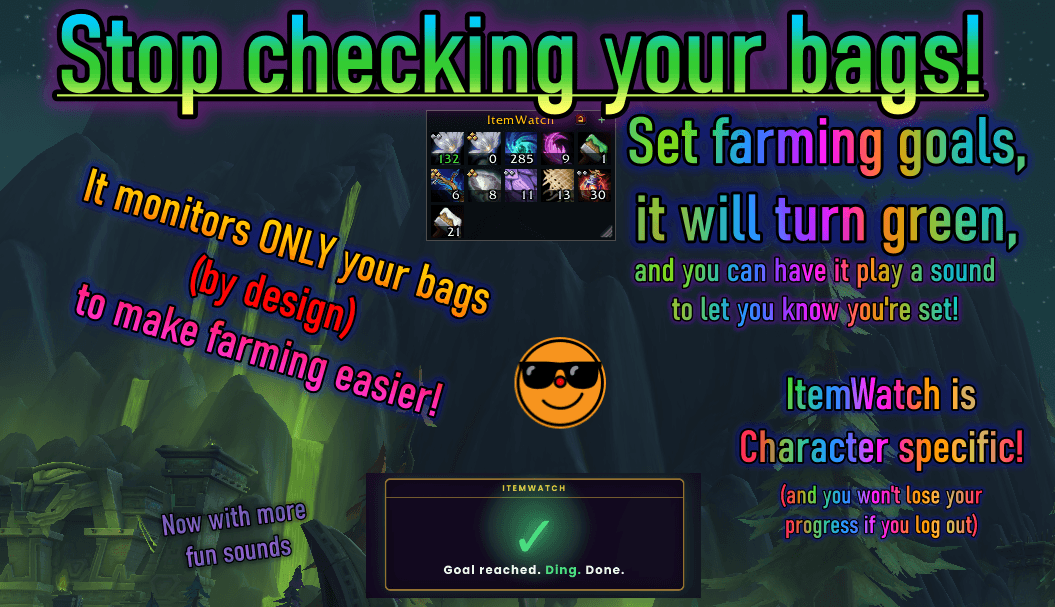
Stop Checking Your Bags! ItemWatch lets you keep farming, and check items at a glance instead of rifling through your bags every whipstitch. Herbs, Transmogs, Ore, Lumber, Leather, and More - if you can loot it you can track it, and play a sound when done!
thisItemwatchnewfeatureshopping.png
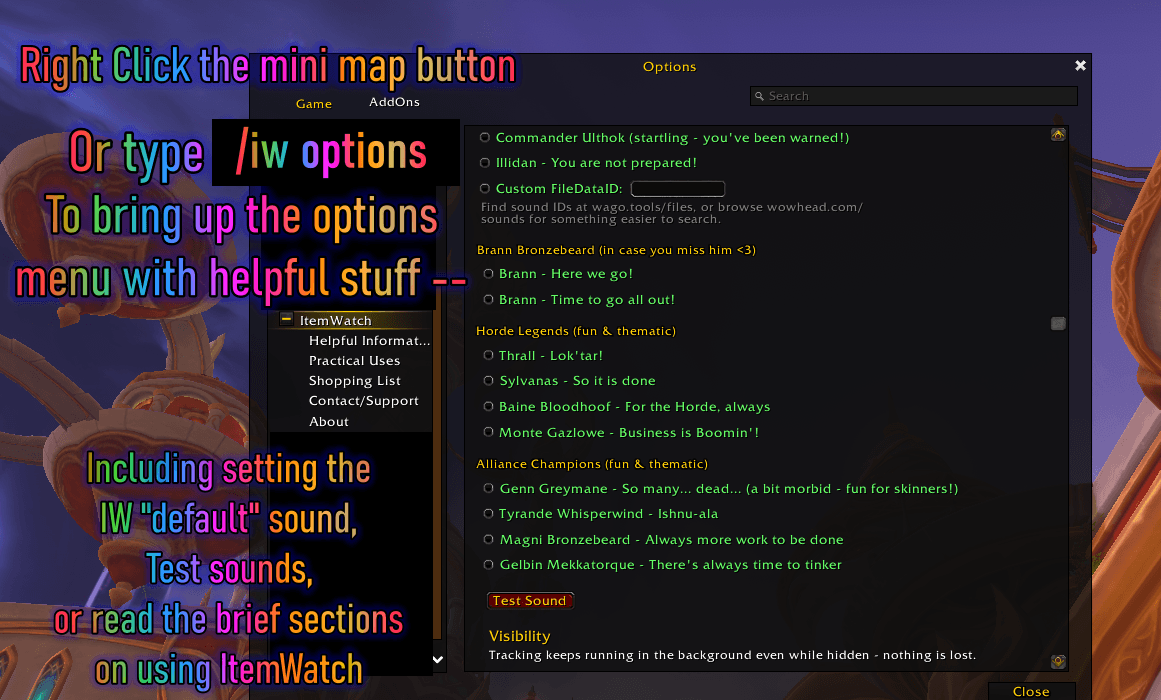
/iw options menu brings this up to set the default sound, test the sounds, read the brief documentations, and set the visibility for pet battles, combat, or show/hide the minimap button.
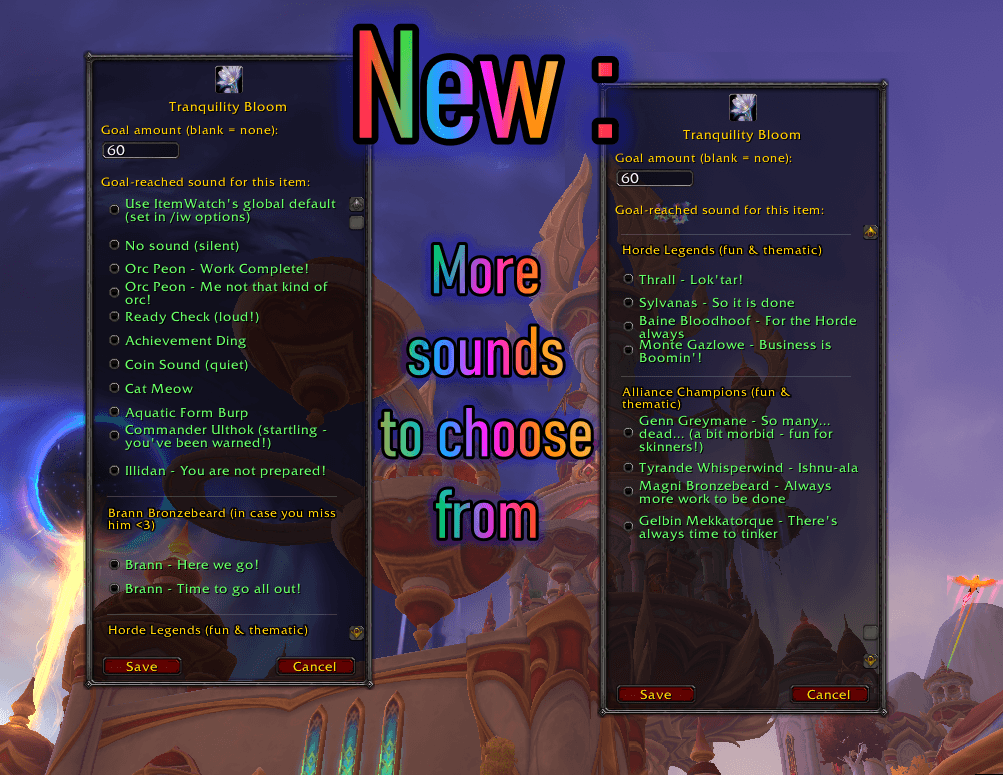
Extra menu shown for visibility, it's one menu with a scroll bar, not two, but I wanted to showcase all our new sounds to pick from!
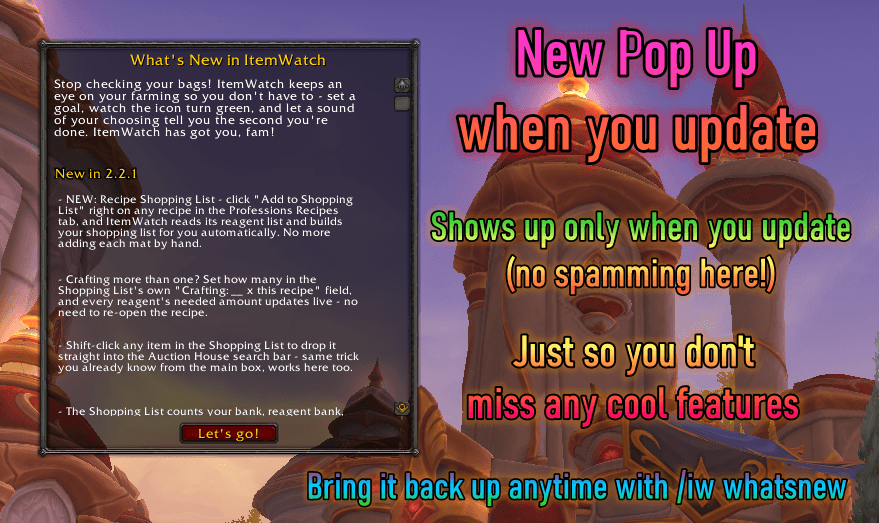
ONLY when you update (or type in /iw whatsnew) you'll see the pop up, so you don't miss any new features I'm implementing. Won't spam you every time you log in, but will show up on alts the first time you log into them after updating!
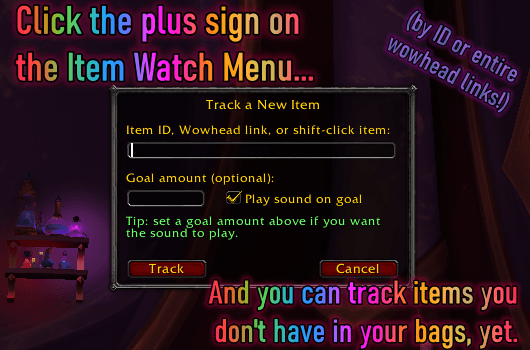
Clicking on the little + (plus) sign on the ItemWatch box menu will let you add and track items not in your bags yet, by ID, entire wowhead links, or shift clicking the item into the IW Track a New Item menu!
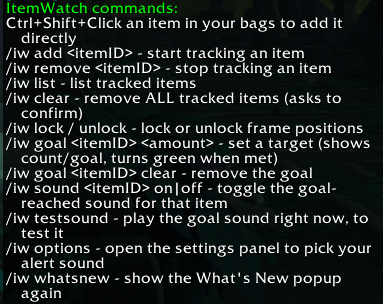
This is just a quick list to let you know what slash commands are available if you prefer to type them out. Typing "/iw" will bring up this list (without quotes), most of these aren't necessary, since the menus already do most of the work now.
Description
ItemWatch
A World of Warcraft addon for tracking specific item counts — a movable, resizable box you drag items into, with goals, per-item sounds, and a minimap button. Now also builds a shopping list straight from any crafting recipe.
Built for farming, collecting, or any situation where you need to keep an eye on an exact item count without repeatedly opening your bags.
Features
- Item Box — a movable, resizable container for everything you're tracking. Drag items from your bags straight onto it, right-click an icon inside to remove it.
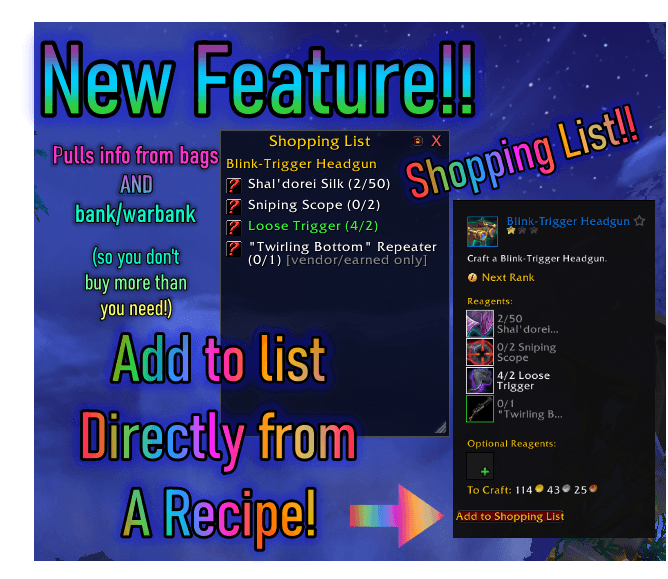
- Recipe Shopping List — click "Add to Shopping List" on any recipe in the Professions Recipes tab, and ItemWatch reads its full reagent list and builds a shopping list for you automatically. Making more than one? Set the quantity right in the window ("Crafting: __ x this recipe") and every reagent's needed amount updates live - no need to re-add the recipe. Required reagents track live progress (counting bank and warband bank, not just bags) and show a "Need: X" line for anything you're still short on, so there's no mental math while you're standing at the Auction House. Optional/finishing reagents show as a plain reminder, and reagents you can't buy on the Auction House are flagged "[vendor/earned only]" instead of silently vanishing. The window is movable, resizable, lockable, persists across logout/reload, and asks before replacing an already-open list so an accidental click won't wipe your progress.
- Quick-Add popup — track items you don't have yet by pasting a Wowhead link, typing an item ID, or shift-clicking an item straight into the field. Set a goal and sound in one step.
- Per-item edit popup — left-click any tracked icon to change its goal or pick its own custom "goal reached" sound (or mute it).
- Per-item ding sounds — no more one generic sound for everything; give each tracked item its own, so you know what just hit its goal without looking. A growing collection of fun/thematic presets alongside the practical ones - see the Sound Presets section below for the full list.
- Shift-click to link, Ctrl-click to preview — tracked icons behave like real item icons for chat links and equippable-gear previews.
- Character-specific tracking — each character keeps its own list. The main Item Box is deliberately bags + reagent bag only, real-time, so counts are always exactly accurate (no bank/warband padding the number). The Shopping List is the one place that does check your bank and warband, since it's answering a different question - "do I still need to go buy this."
- Blizzard Edit Mode support for the box.
- Combat / pet battle visibility toggles — hide the box automatically if you'd rather it stay out of the way. Tracking keeps running in the background regardless.
- Minimap button — left-click to show/hide the box, right-click for settings. Built on LibDataBroker + LibDBIcon, so it's automatically compatible with minimap button "tray" addons (ElvUI's built-in one, Dominos, Bartender4, MBB, SexyMap, etc.).
- In-game documentation — the settings panel has expandable sub-pages covering how to use ItemWatch, the Recipe Shopping List, practical usage ideas (like Auction House shopping lists built from the main box), and contact/support info.
- What's New popup — a quick highlight reel shows once after each
update (and doubles as an intro if you're new to ItemWatch). Bring it
back any time with
/iw whatsnew. - All the original
/iwslash commands still work, unchanged — the box and popups are additional ways in, not replacements. - Lightweight — event-driven, no polling.
Installation
Recommended: install via CurseForge.
Manual install:
- Download the latest release, or clone this repo.
- Copy the
ItemWatchfolder (including theLibssubfolder) into your WoW AddOns directory:World of Warcraft/_retail_/Interface/AddOns/ - Restart WoW or
/reload.
Usage
The easy way:
- Drag an item from your bags onto the box to start tracking it.
- Left-click the icon inside the box to set a goal and pick a sound.
- Right-click the icon to stop tracking it.
For items you don't have yet:
- Click the "+" on the box (or right-click empty space inside it).
- Paste a Wowhead link, type the item ID, or shift-click an item to fill the field automatically.
- Set a goal and sound preference, click Track.
Building a shopping list from a recipe:
- Open any profession's Recipes tab and select a recipe.
- Click "Add to Shopping List."
- Required reagents show live have/needed progress (bank + reagent bank
- warband bank included), optional reagents show as a reminder, and anything you can't buy is flagged "[vendor/earned only]."
- The window sticks around - move it, resize it, lock it, or just leave it open. It'll still be there if you log out mid-farm.
Commands
| Command | Description |
|---|---|
/iw add [itemID] |
Start tracking an item |
/iw remove [itemID] |
Stop tracking an item |
/iw list |
List everything currently tracked |
/iw clear |
Remove all tracked items (asks to confirm) |
/iw lock |
Lock the box in place |
/iw unlock |
Unlock the box so you can move/resize it |
/iw goal [itemID] [amount] |
Set a target amount for an item |
/iw goal [itemID] clear |
Remove the goal for an item |
/iw sound [itemID] on|off |
Toggle the goal-reached sound for an item |
/iw testsound |
Preview the default goal sound |
/iw addrecipe |
Add the currently-open recipe to the Shopping List |
/iw whatsnew |
Show the What's New popup again |
/iw options |
Open the settings panel |
Ctrl+Shift+Click an item in your bags also adds it directly, no item ID needed (default Blizzard bag UI only).
Settings
Find ItemWatch's settings under Options > AddOns > ItemWatch in-game, or
type /iw options, or right-click the minimap button. From there you can
set per-item sounds, combat/pet-battle visibility toggles, and show/hide
the minimap button.
The settings panel also has an expandable "+" with sub-pages: Helpful Information (how everything works), Shopping List (how the recipe-based shopping list works), Practical Uses (real workflows like building an Auction House list from the main box), Contact/Support, and About.
Sound Presets
Every tracked item can play its own sound when its goal is reached - mix and match as many as you like, or leave one as your global default. Alongside the practical picks (Ready Check, Achievement Ding, Coin Sound), there's a growing collection of fun/thematic ones:
- Orc Peon - "Work Complete!" (the default) and "Me not that kind of orc!"
- Commander Ulthok - startling, you've been warned
- Illidan - "You are not prepared!"
- Brann Bronzebeard - "Here we go!" and "Time to go all out!"
- Horde Legends - Thrall ("Lok'tar!"), Sylvanas ("So it is done"), Baine Bloodhoof ("For the Horde, always"), Monte Gazlowe ("Business is Boomin'!")
- Alliance Champions - Genn Greymane ("So many… dead…" - a bit morbid, fun for skinners!), Tyrande Whisperwind ("Ishnu-ala"), Magni Bronzebeard ("Always more work to be done"), Gelbin Mekkatorque ("There's always time to tinker")
Prefer something not on the list? There's also a Custom FileDataID option, so you can use any sound file ID you can find (try wago.tools/files or search wowhead.com/sounds).
Notes
- Tracked items are saved per-character, so each character keeps their own independent list.
- The addon bundles LibStub, CallbackHandler-1.0, LibDataBroker-1.1, and
LibDBIcon-1.0 in the
Libsfolder for the minimap button - these are widely-used shared libraries, not custom code. - Manual install / cloning: make sure the
Libsfolder (and its four subfolders) comes along withItemWatch.luaandItemWatch.tocinto your AddOns folder. If you use GitHub's green "Code" button and download the ZIP, this happens automatically. If you're grabbing files one at a time, don't skipLibs- without it, the minimap button won't appear (the rest of the addon still works fine, it just quietly skips that one feature). - The Ctrl+Shift+Click add-from-bags shortcut only works with Blizzard's
default bag UI. If you use a bag-replacement addon (Baganator,
ArkInventory, Bagnon, etc.), use
/iw add [itemID]or the Quick-Add popup instead.
Contributing / Issues
Found a bug or have a feature idea? Open an issue — feedback and suggestions welcome.
License
MIT — see LICENSE for details.
If you find ItemWatch useful, consider supporting me on Ko-fi — totally optional, but always appreciated! You can also find me on Twitch, YouTube, or Discord - NerdyBertie's Tinker Workshop
The ItemWatch - Bag Item Counter Team